Show code
Seaborn version: 0.13.2
Matplotlib version: 3.10.3By: MIN Sothearith
Seaborn provides carefully designed color palettes:
fig, axes = plt.subplots(3, 2, figsize=(16, 14))

palettes = ['deep', 'muted', 'pastel', 'bright', 'dark', 'colorblind']

for idx, palette in enumerate(palettes):
    row = idx // 2
    col = idx % 2

    colors = sns.color_palette(palette, 8)
    sns.palplot(colors, size=1)

    # Display in subplot
    axes[row, col].imshow([colors], aspect='auto')
    axes[row, col].set_title(f'Palette: {palette}', fontsize=16)
    axes[row, col].axis('off')

plt.tight_layout()
plt.show()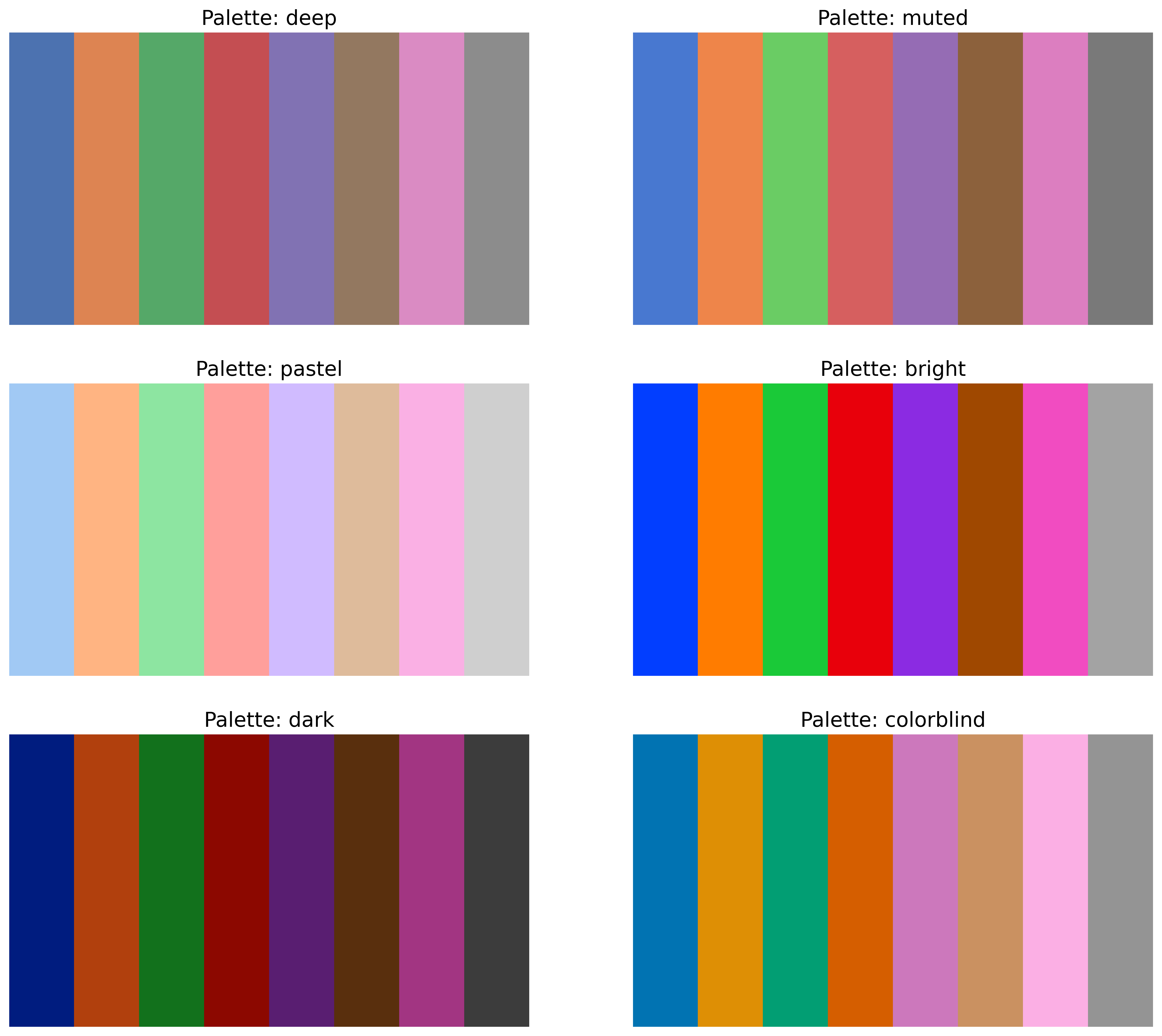






Use sns.set_palette() to apply a palette globally.
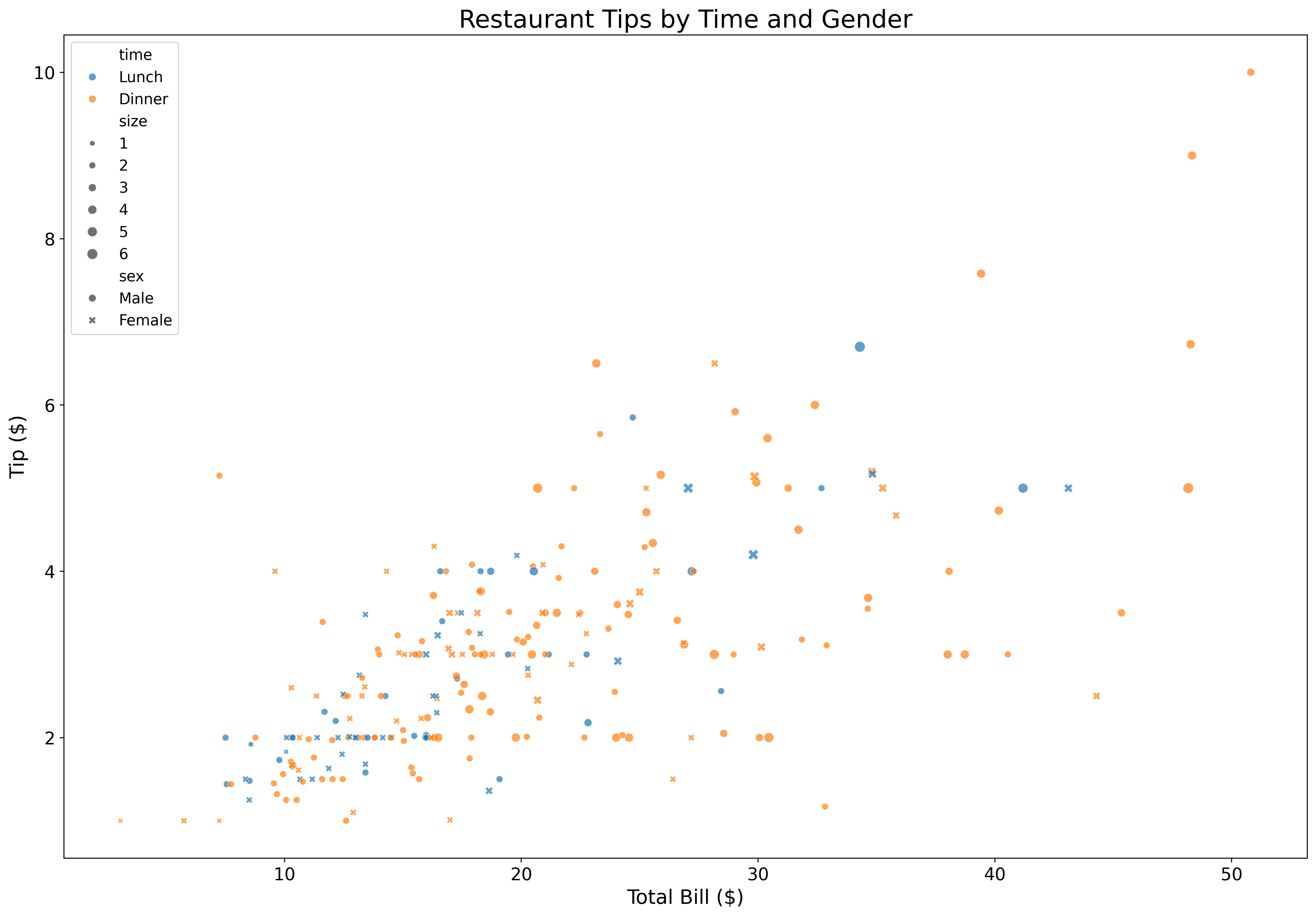
Add categorical dimensions with color:
fig, ax = plt.subplots(figsize=(18, 12))

tips = sns.load_dataset('tips')

sns.scatterplot(data=tips,
                x='total_bill',
                y='tip',
                hue='time',
                style='sex',
                size='size',
                alpha=0.7,
                ax=ax)

ax.set_xlabel('Total Bill ($)', fontsize=16)
ax.set_ylabel('Tip ($)', fontsize=16)
ax.set_title('Restaurant Tips by Time and Gender', fontsize=20)
ax.tick_params(labelsize=14)
ax.legend(fontsize=12)
plt.show()
Seaborn automatically creates beautiful legends for categorical variables.
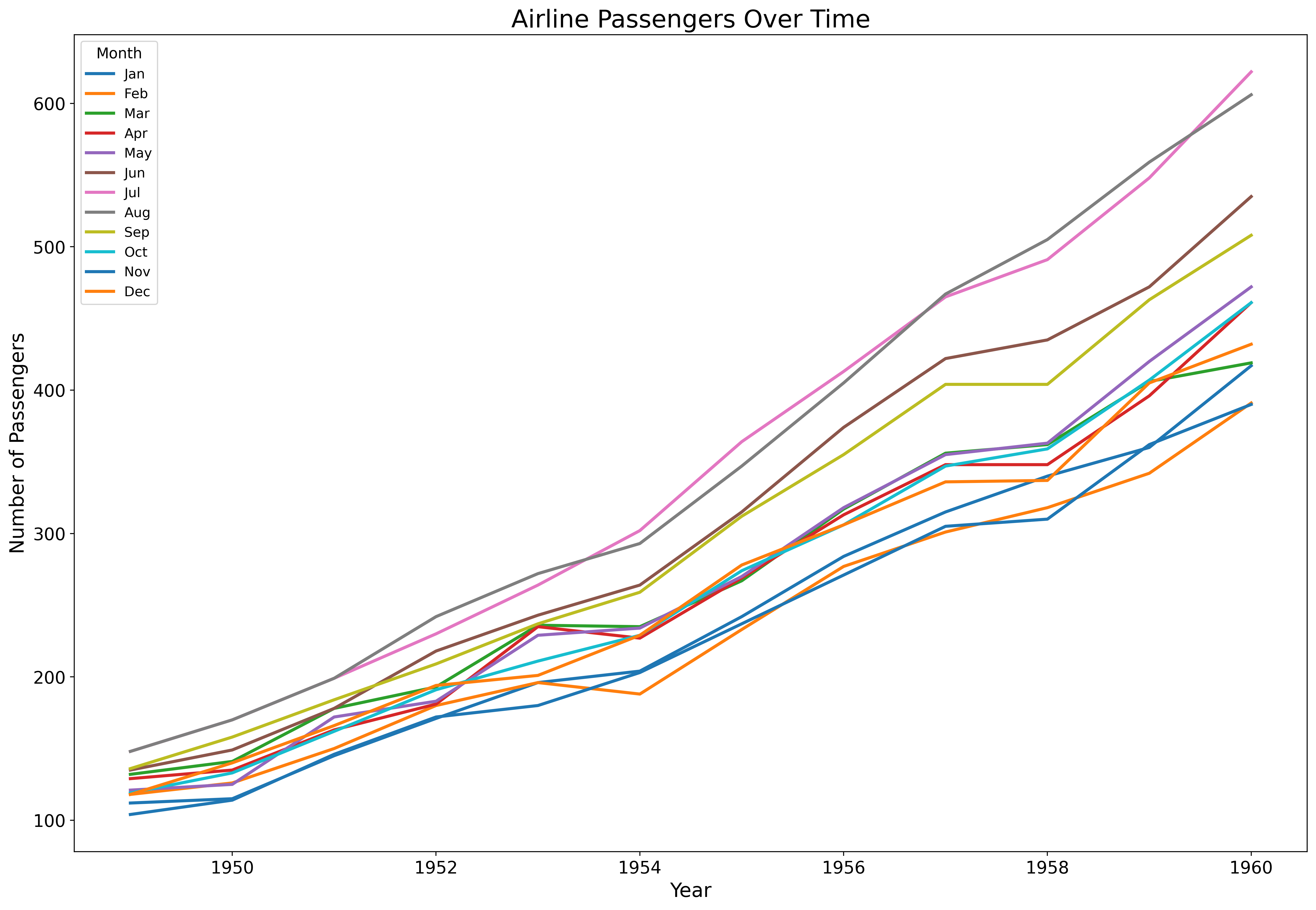
Perfect for time series and trends:
fig, ax = plt.subplots(figsize=(18, 12))

flights = sns.load_dataset('flights')

sns.lineplot(data=flights,
             x='year',
             y='passengers',
             hue='month',
             palette='tab10',
             linewidth=2.5,
             ax=ax)

ax.set_xlabel('Year', fontsize=16)
ax.set_ylabel('Number of Passengers', fontsize=16)
ax.set_title('Airline Passengers Over Time', fontsize=20)
ax.tick_params(labelsize=14)
ax.legend(title='Month', fontsize=11, title_fontsize=12)
plt.show()
Line plots automatically aggregate and show confidence intervals.
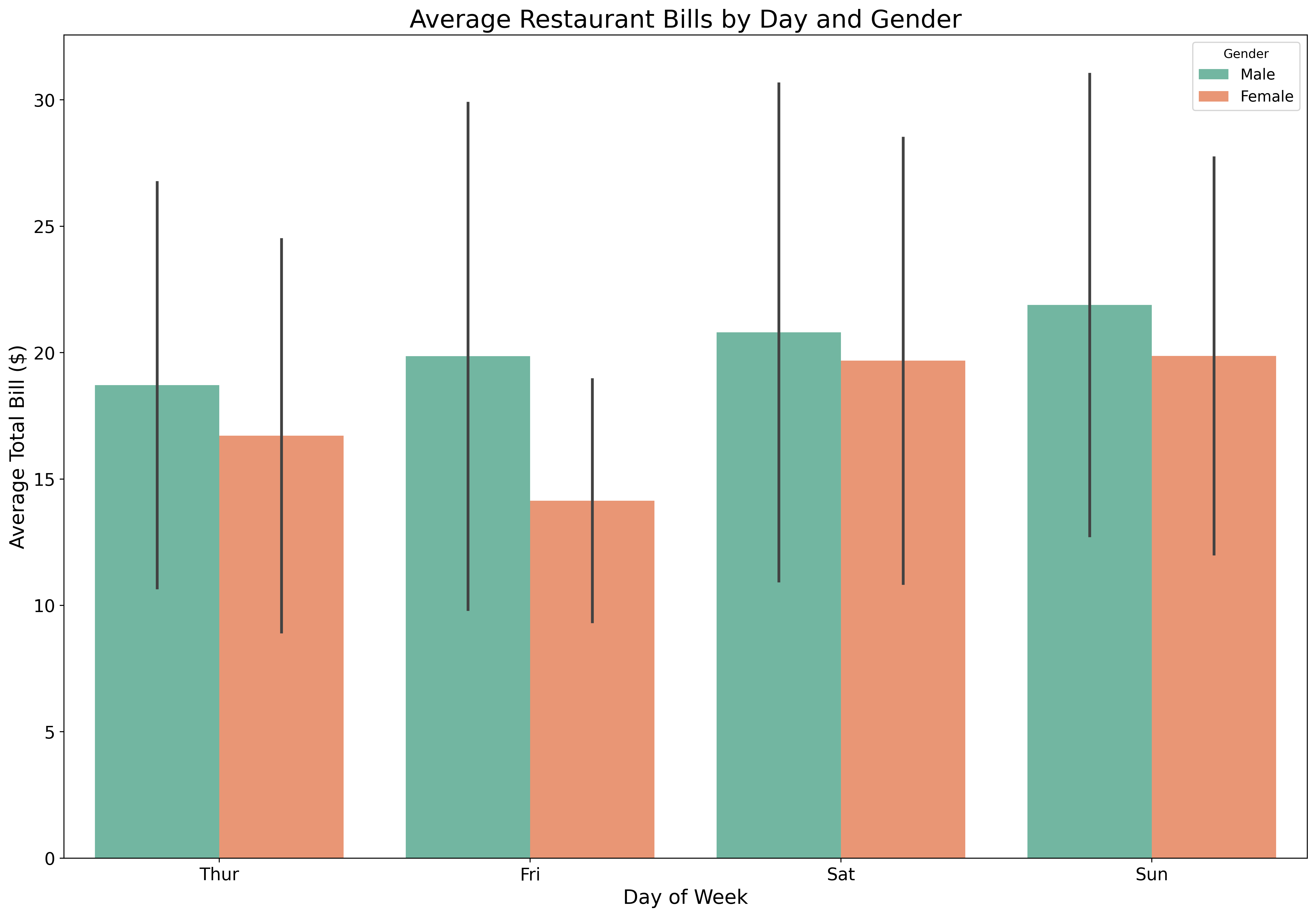
Show means and confidence intervals:
fig, ax = plt.subplots(figsize=(18, 12))

tips = sns.load_dataset('tips')

sns.barplot(data=tips,
            x='day',
            y='total_bill',
            hue='sex',
            palette='Set2',
            errorbar='sd',
            ax=ax)

ax.set_xlabel('Day of Week', fontsize=16)
ax.set_ylabel('Average Total Bill ($)', fontsize=16)
ax.set_title('Average Restaurant Bills by Day and Gender', fontsize=20)
ax.tick_params(labelsize=14)
ax.legend(title='Gender', fontsize=12)
plt.show()
Seaborn automatically calculates statistics and error bars!
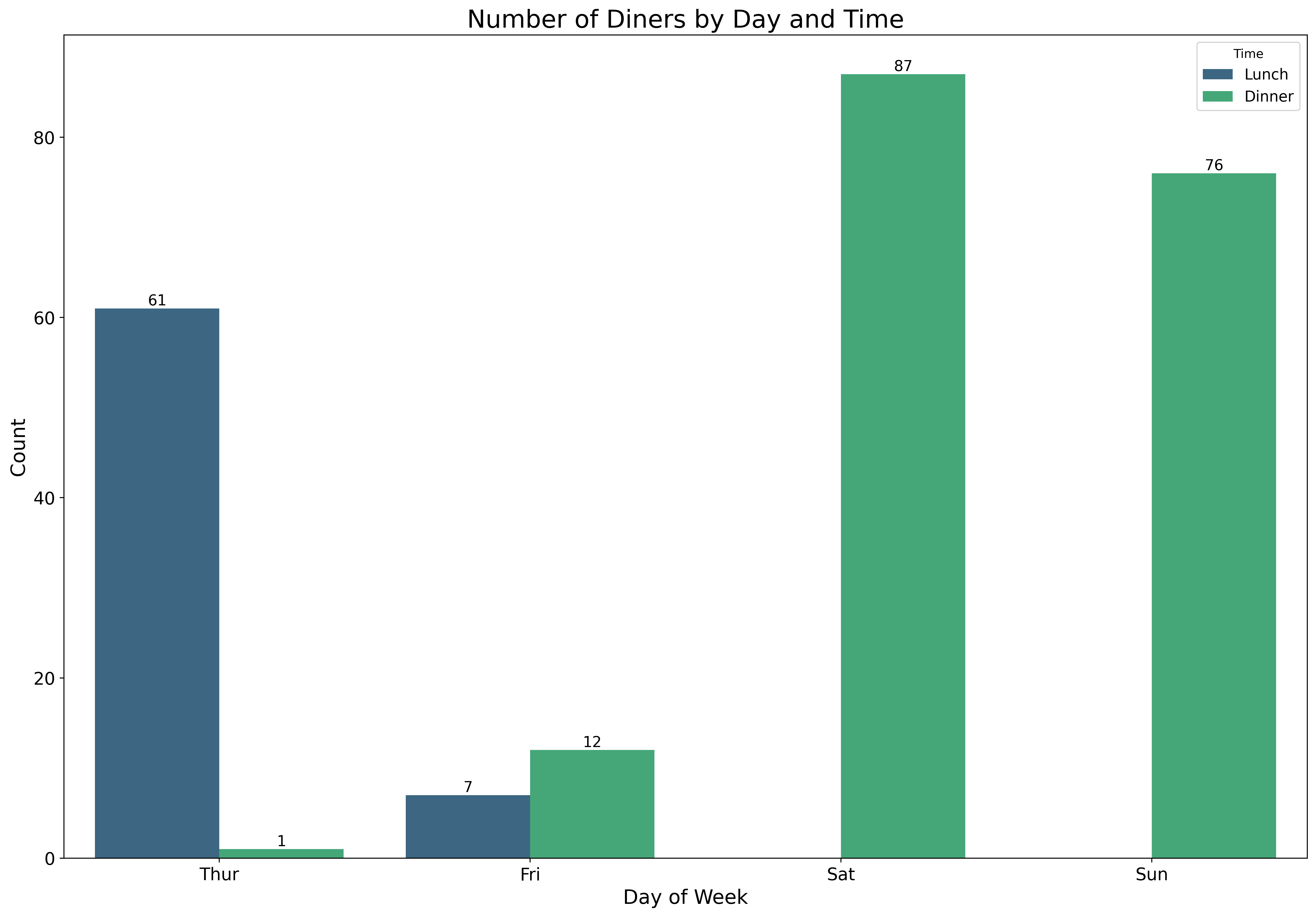
Visualize categorical distributions:
fig, ax = plt.subplots(figsize=(18, 12))

tips = sns.load_dataset('tips')

sns.countplot(data=tips,
              x='day',
              hue='time',
              palette='viridis',
              ax=ax)

ax.set_xlabel('Day of Week', fontsize=16)
ax.set_ylabel('Count', fontsize=16)
ax.set_title('Number of Diners by Day and Time', fontsize=20)
ax.tick_params(labelsize=14)
ax.legend(title='Time', fontsize=12)

# Add value labels on bars
for container in ax.containers:
    ax.bar_label(container, fontsize=12)

plt.show()
Count plots are perfect for showing frequencies of categorical variables.
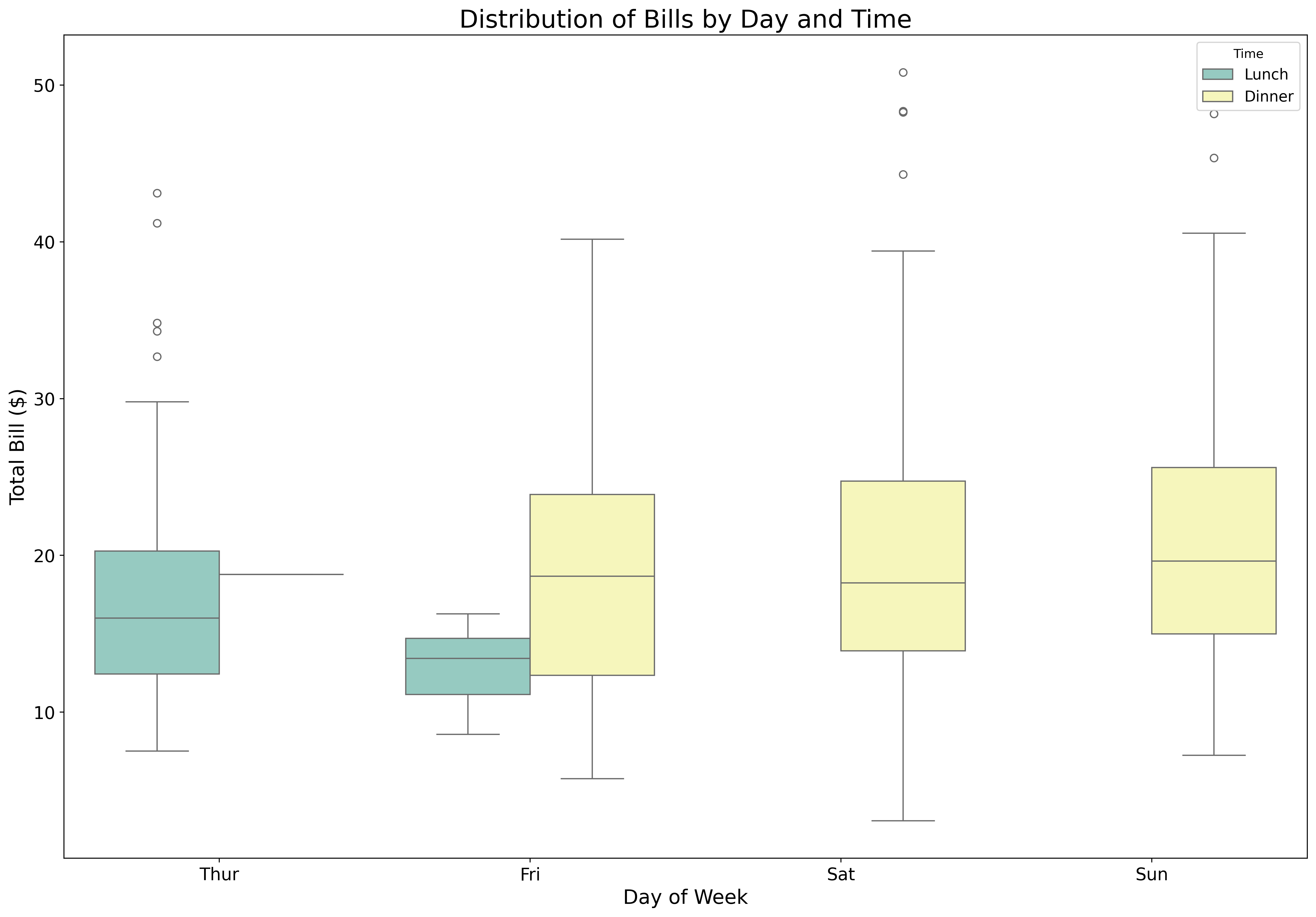
Display distributions with quartiles:
fig, ax = plt.subplots(figsize=(18, 12))

tips = sns.load_dataset('tips')

sns.boxplot(data=tips,
            x='day',
            y='total_bill',
            hue='time',
            palette='Set3',
            ax=ax)

ax.set_xlabel('Day of Week', fontsize=16)
ax.set_ylabel('Total Bill ($)', fontsize=16)
ax.set_title('Distribution of Bills by Day and Time', fontsize=20)
ax.tick_params(labelsize=14)
ax.legend(title='Time', fontsize=12)
plt.show()
Box plots show median, quartiles, and outliers - perfect for comparing distributions.
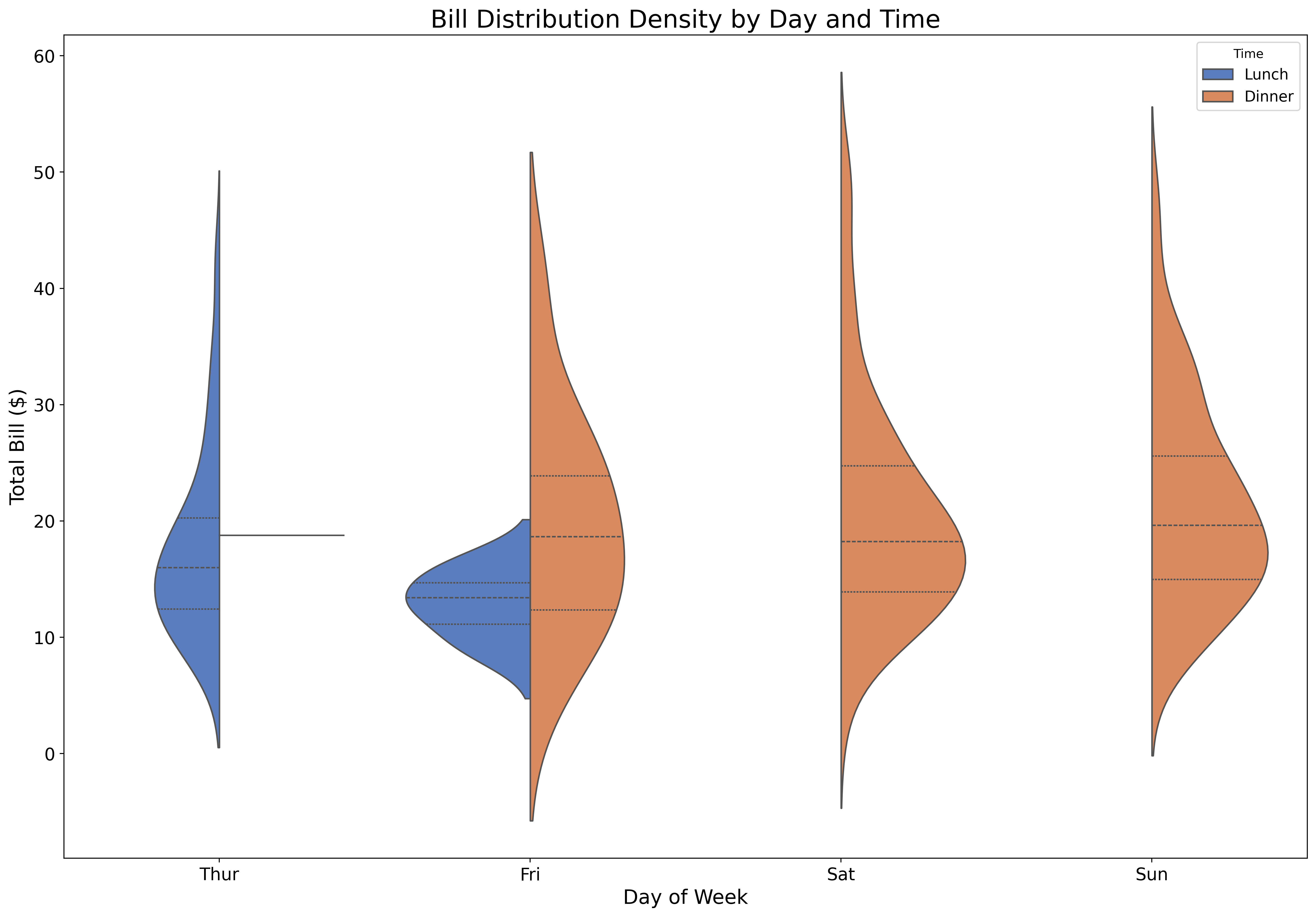
Combine box plots with distribution density:
fig, ax = plt.subplots(figsize=(18, 12))

tips = sns.load_dataset('tips')

sns.violinplot(data=tips,
               x='day',
               y='total_bill',
               hue='time',
               split=True,
               palette='muted',
               inner='quartile',
               ax=ax)

ax.set_xlabel('Day of Week', fontsize=16)
ax.set_ylabel('Total Bill ($)', fontsize=16)
ax.set_title('Bill Distribution Density by Day and Time', fontsize=20)
ax.tick_params(labelsize=14)
ax.legend(title='Time', fontsize=12)
plt.show()
Violin plots reveal the full distribution shape, showing where data is concentrated.
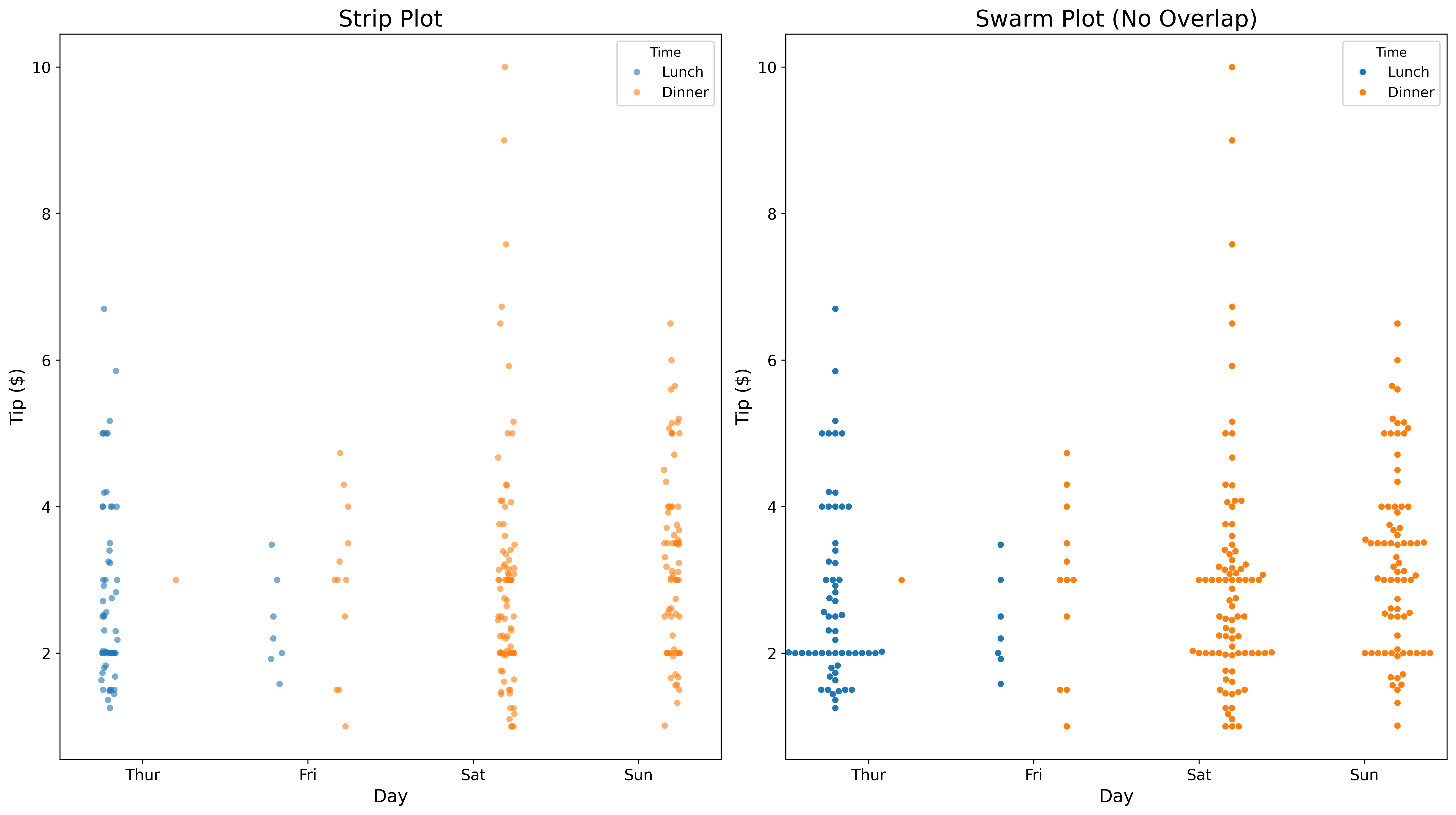
Show individual data points:
fig, axes = plt.subplots(1, 2, figsize=(16, 9))

tips = sns.load_dataset('tips')

# Strip plot
sns.stripplot(data=tips,
              x='day',
              y='tip',
              hue='time',
              dodge=True,
              alpha=0.6,
              ax=axes[0])
axes[0].set_title('Strip Plot', fontsize=18)
axes[0].set_xlabel('Day', fontsize=14)
axes[0].set_ylabel('Tip ($)', fontsize=14)
axes[0].tick_params(labelsize=12)
axes[0].legend(title='Time', fontsize=11)

# Swarm plot
sns.swarmplot(data=tips,
              x='day',
              y='tip',
              hue='time',
              dodge=True,
              ax=axes[1])
axes[1].set_title('Swarm Plot (No Overlap)', fontsize=18)
axes[1].set_xlabel('Day', fontsize=14)
axes[1].set_ylabel('Tip ($)', fontsize=14)
axes[1].tick_params(labelsize=12)
axes[1].legend(title='Time', fontsize=11)

plt.tight_layout()
plt.show()
Strip plots show all points; swarm plots arrange them to avoid overlap.
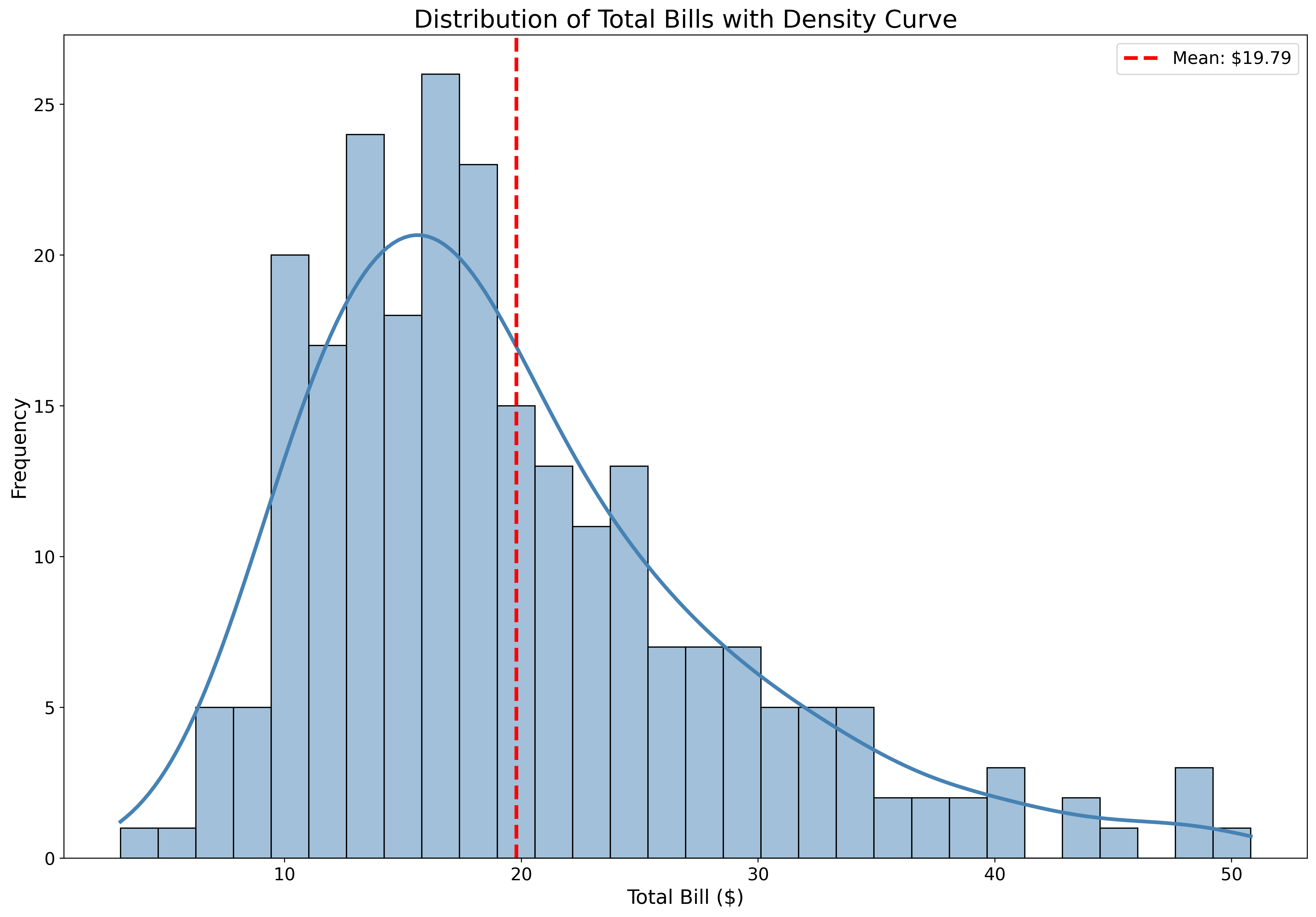
Combine histograms with density curves:
fig, ax = plt.subplots(figsize=(18, 12))

tips = sns.load_dataset('tips')

sns.histplot(data=tips,
             x='total_bill',
             kde=True,
             color='steelblue',
             bins=30,
             line_kws={'linewidth': 3},
             ax=ax)

ax.set_xlabel('Total Bill ($)', fontsize=16)
ax.set_ylabel('Frequency', fontsize=16)
ax.set_title('Distribution of Total Bills with Density Curve', fontsize=20)
ax.tick_params(labelsize=14)
ax.axvline(tips['total_bill'].mean(), color='red', linestyle='--',
           linewidth=3, label=f'Mean: ${tips["total_bill"].mean():.2f}')
ax.legend(fontsize=14)
plt.show()
KDE (Kernel Density Estimation) shows the smooth distribution shape.
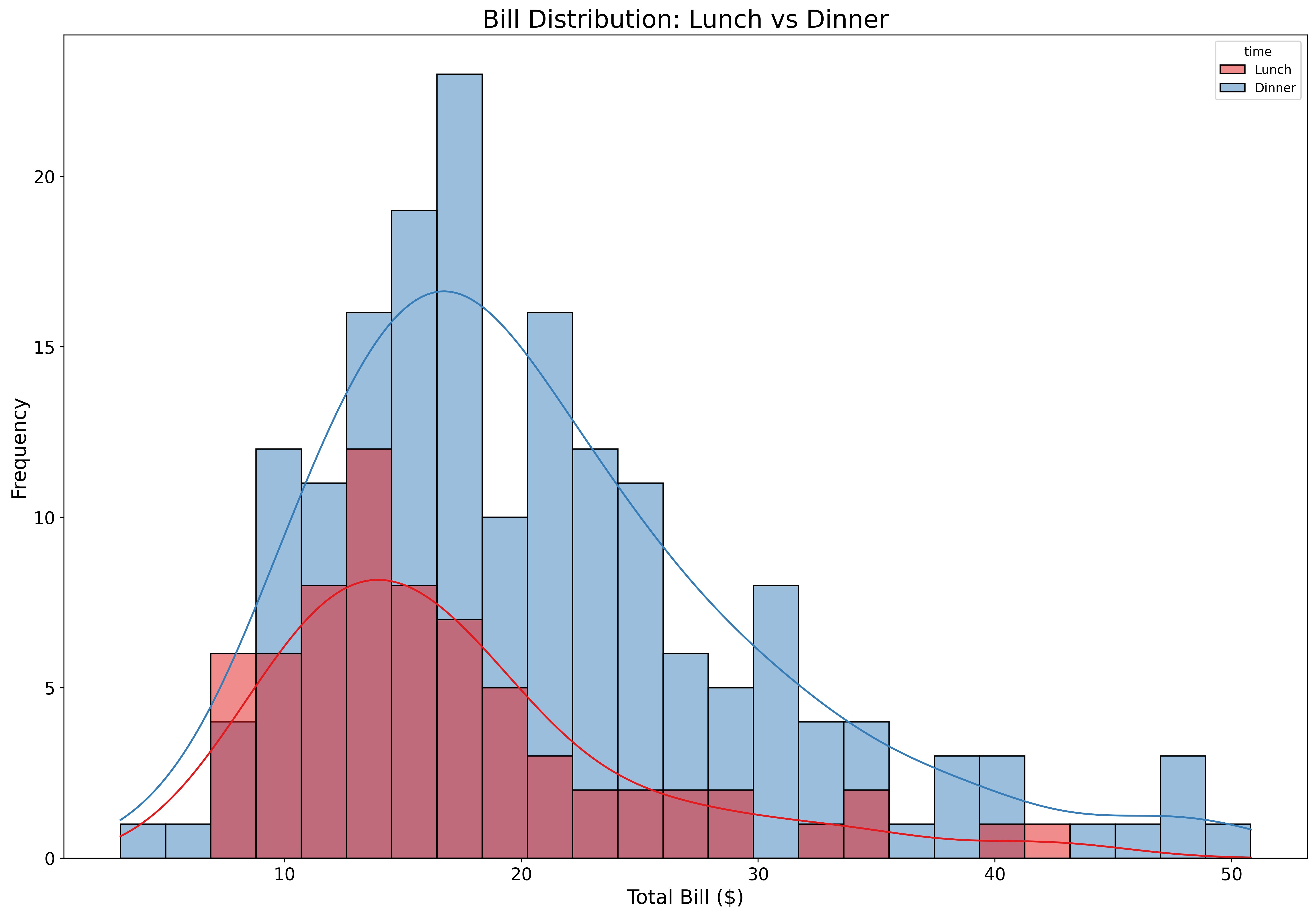
Compare multiple distributions:
fig, ax = plt.subplots(figsize=(18, 12))

tips = sns.load_dataset('tips')

sns.histplot(data=tips,
             x='total_bill',
             hue='time',
             kde=True,
             alpha=0.5,
             bins=25,
             palette='Set1',
             legend = True,
             ax=ax)

ax.set_xlabel('Total Bill ($)', fontsize=16)
ax.set_ylabel('Frequency', fontsize=16)
ax.set_title('Bill Distribution: Lunch vs Dinner', fontsize=20)
ax.tick_params(labelsize=14)
plt.show()
Overlapping histograms reveal differences in distributions between groups.
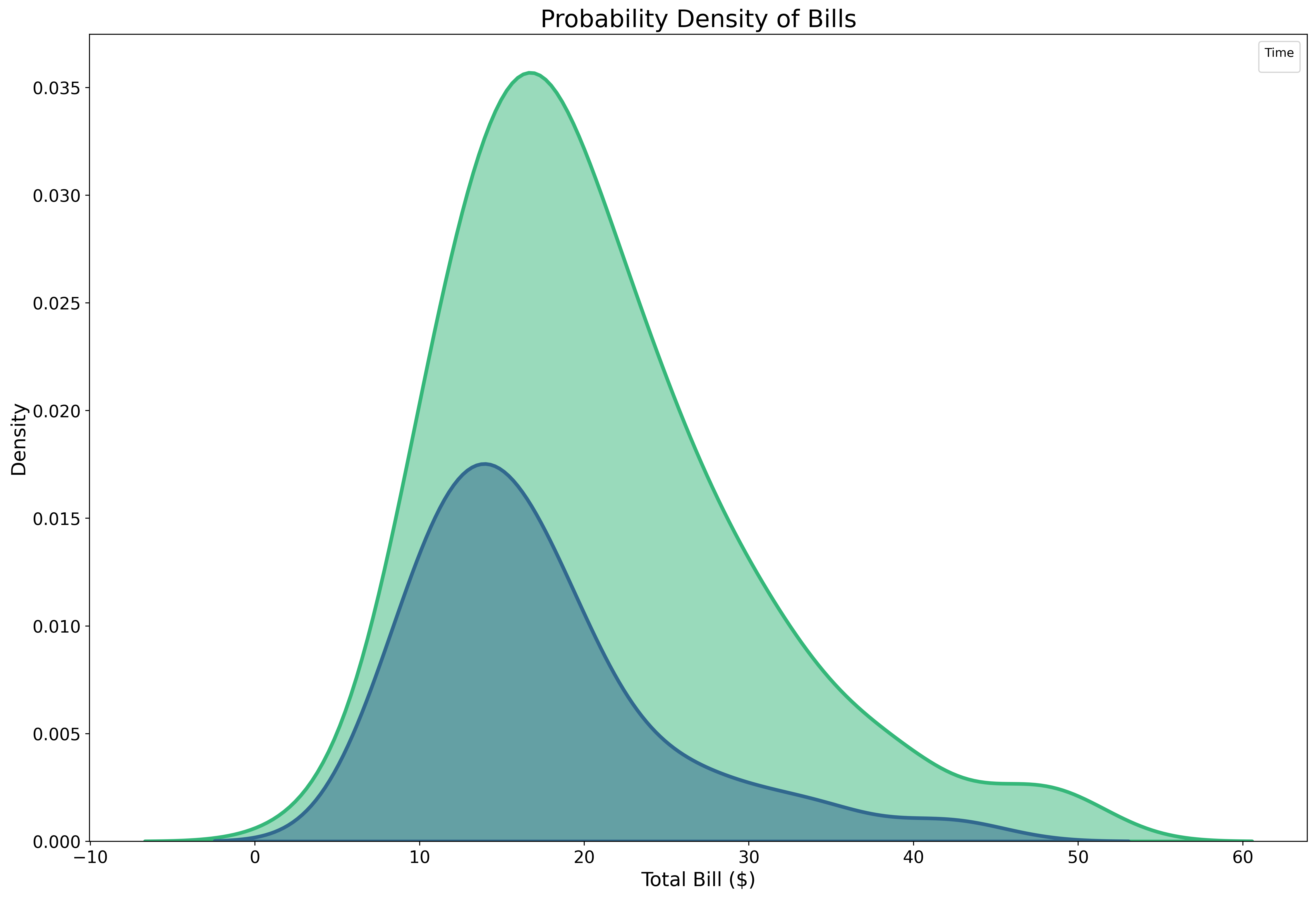
Pure density visualization:
fig, ax = plt.subplots(figsize=(18, 12))

tips = sns.load_dataset('tips')

sns.kdeplot(data=tips,
            x='total_bill',
            hue='time',
            fill=True,
            alpha=0.5,
            linewidth=3,
            palette='viridis',
            ax=ax)

ax.set_xlabel('Total Bill ($)', fontsize=16)
ax.set_ylabel('Density', fontsize=16)
ax.set_title('Probability Density of Bills', fontsize=20)
ax.tick_params(labelsize=14)
ax.legend(title='Time', fontsize=12)
plt.show()
KDE plots are smooth, continuous representations of distributions.
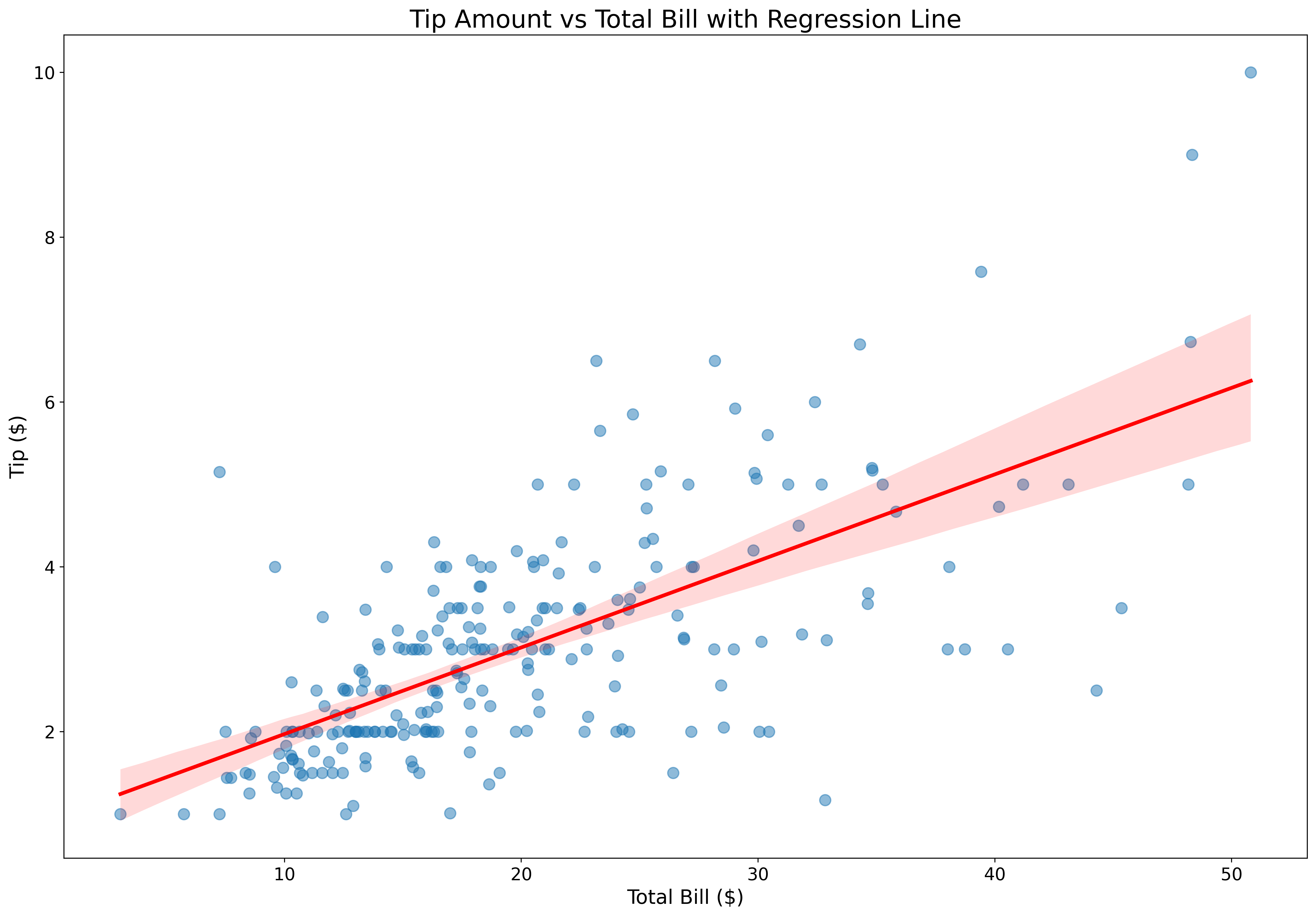
Add trend lines effortlessly:
fig, ax = plt.subplots(figsize=(18, 12))

tips = sns.load_dataset('tips')

sns.regplot(data=tips,
            x='total_bill',
            y='tip',
            scatter_kws={'alpha': 0.5, 's': 80},
            line_kws={'color': 'red', 'linewidth': 3},
            ax=ax)

ax.set_xlabel('Total Bill ($)', fontsize=16)
ax.set_ylabel('Tip ($)', fontsize=16)
ax.set_title('Tip Amount vs Total Bill with Regression Line', fontsize=20)
ax.tick_params(labelsize=14)
plt.show()
Regression plots automatically fit and display trend lines with confidence intervals.
Compare relationships across categories:
fig, ax = plt.subplots(figsize=(18, 12))

tips = sns.load_dataset('tips')

sns.lmplot(data=tips,
           x='total_bill',
           y='tip',
           hue='smoker',
           height=9,
           aspect=14/9,
           scatter_kws={'alpha': 0.5, 's': 80},
           line_kws={'linewidth': 3},
           palette='Set1')

plt.xlabel('Total Bill ($)', fontsize=16)
plt.ylabel('Tip ($)', fontsize=16)
plt.title('Tip Patterns: Smokers vs Non-Smokers', fontsize=20)
plt.tick_params(labelsize=14)
plt.legend(title='Smoker', fontsize=12)
plt.show()
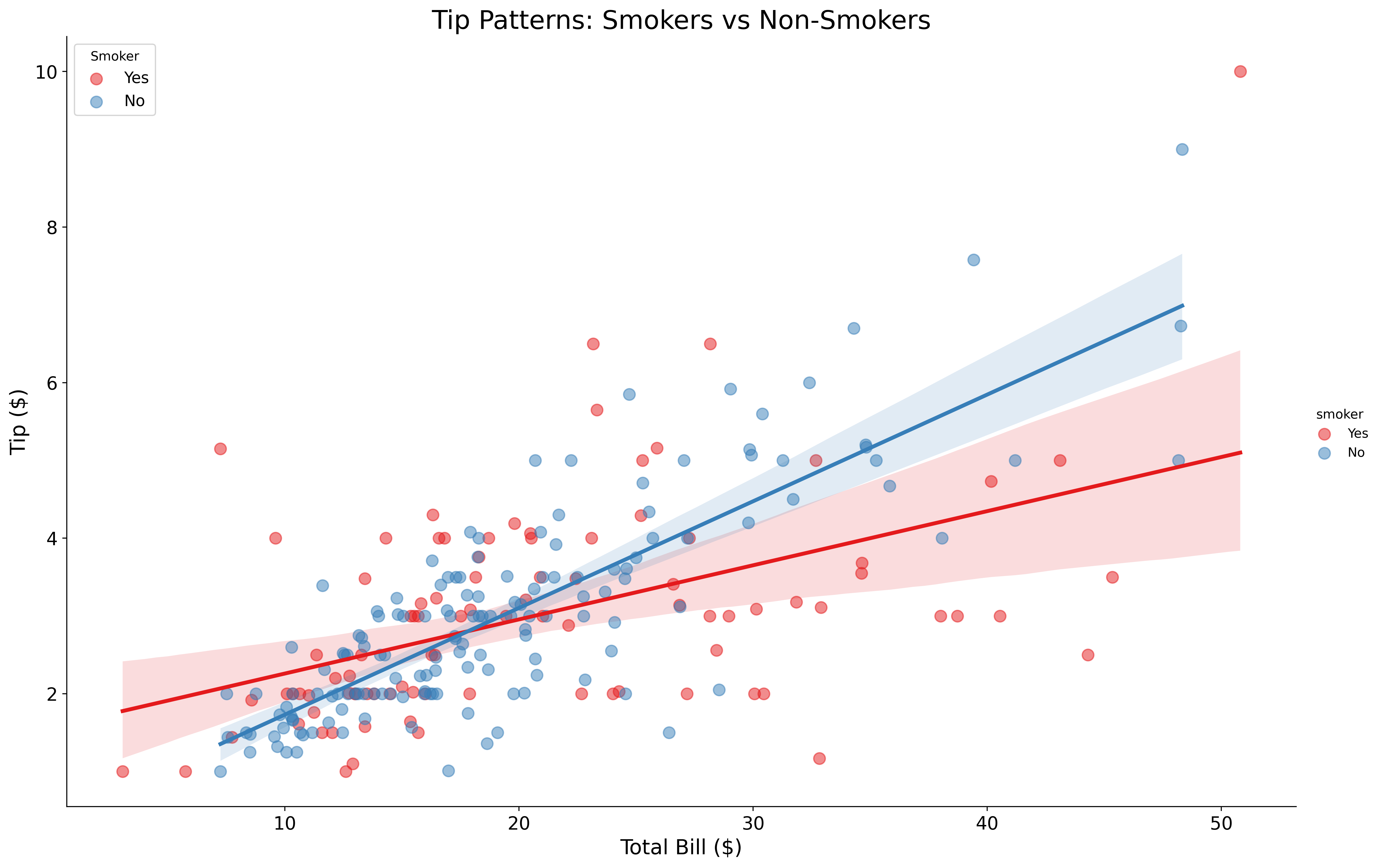
lmplot creates separate regression lines for each category.
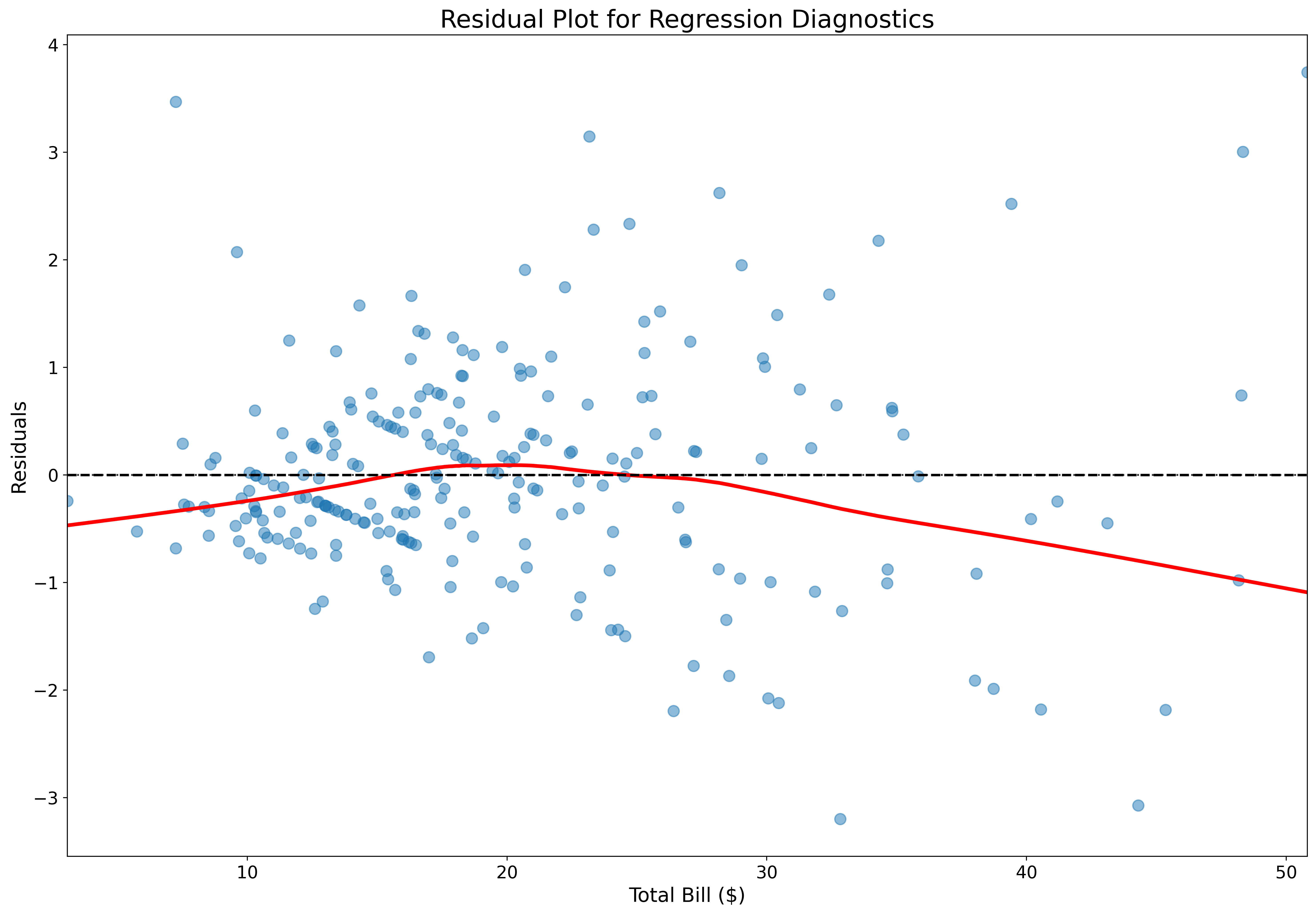
Assess regression quality:
fig, ax = plt.subplots(figsize=(18, 12))

tips = sns.load_dataset('tips')

sns.residplot(data=tips,
              x='total_bill',
              y='tip',
              lowess=True,
              scatter_kws={'alpha': 0.5, 's': 80},
              line_kws={'color': 'red', 'linewidth': 3},
              ax=ax)

ax.set_xlabel('Total Bill ($)', fontsize=16)
ax.set_ylabel('Residuals', fontsize=16)
ax.set_title('Residual Plot for Regression Diagnostics', fontsize=20)
ax.tick_params(labelsize=14)
ax.axhline(0, color='black', linestyle='--', linewidth=2)
plt.show()
Residual plots help identify non-linear patterns and heteroscedasticity.
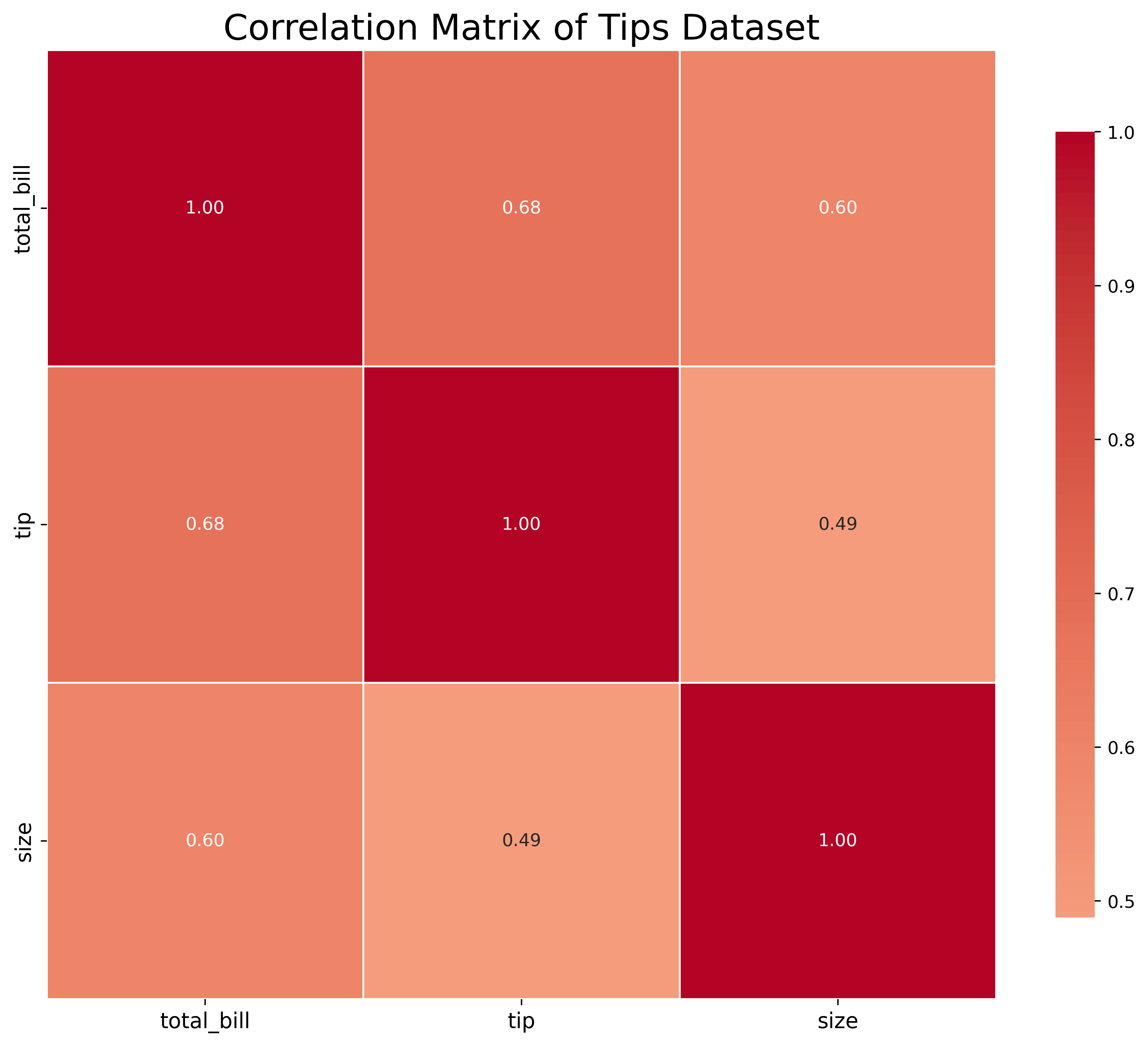
Visualize correlation matrices:
fig, ax = plt.subplots(figsize=(12, 10))

tips = sns.load_dataset('tips')
numeric_cols = tips.select_dtypes(include=[np.number])
correlation = numeric_cols.corr()

sns.heatmap(correlation,
            annot=True,
            fmt='.2f',
            cmap='coolwarm',
            center=0,
            square=True,
            linewidths=1,
            cbar_kws={'shrink': 0.8},
            ax=ax)

ax.set_title('Correlation Matrix of Tips Dataset', fontsize=20)
ax.tick_params(labelsize=12)
plt.show()
Heatmaps make correlation patterns immediately visible.
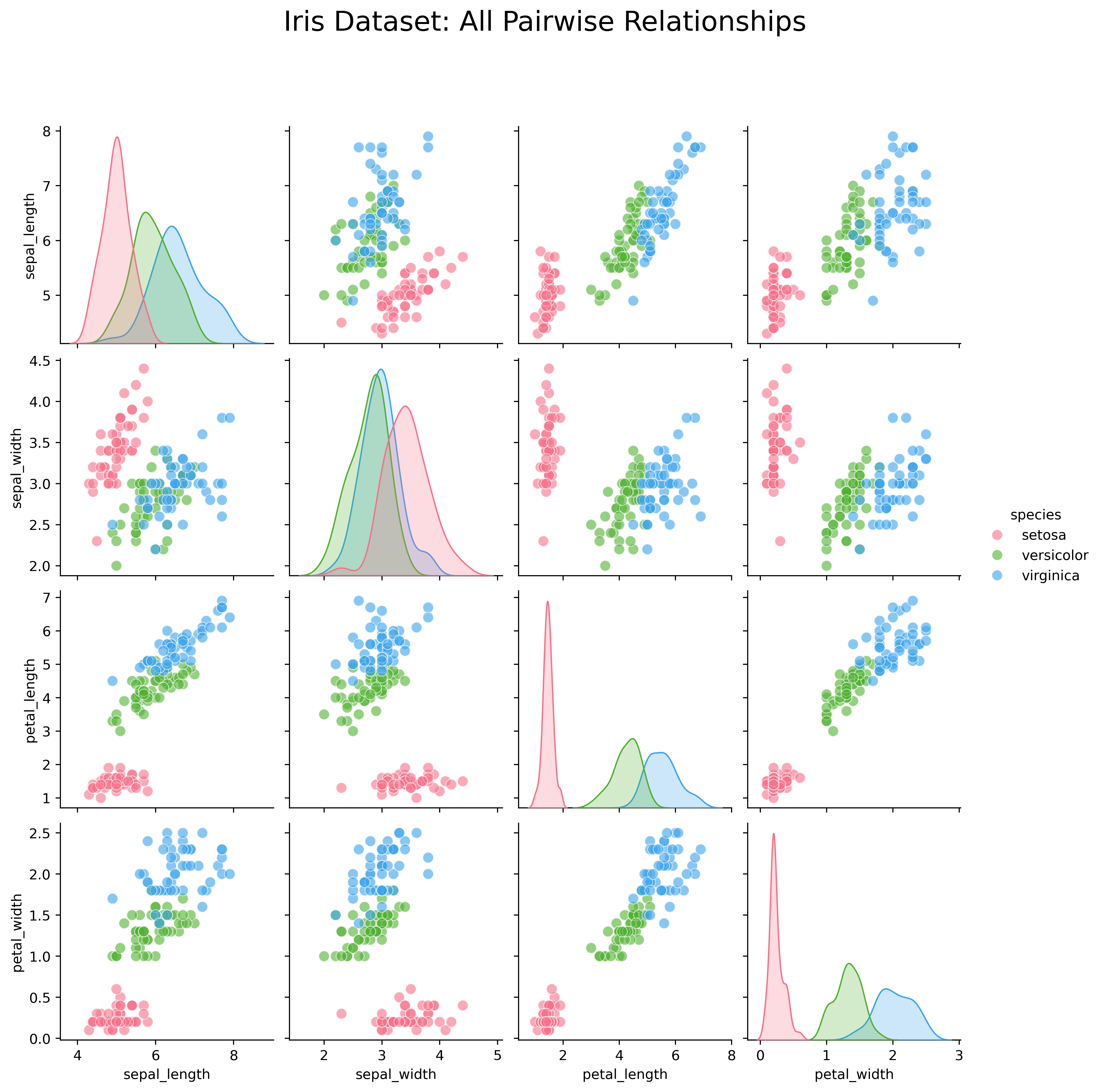
Explore all pairwise relationships:
Pair plots are invaluable for exploratory data analysis and feature selection.
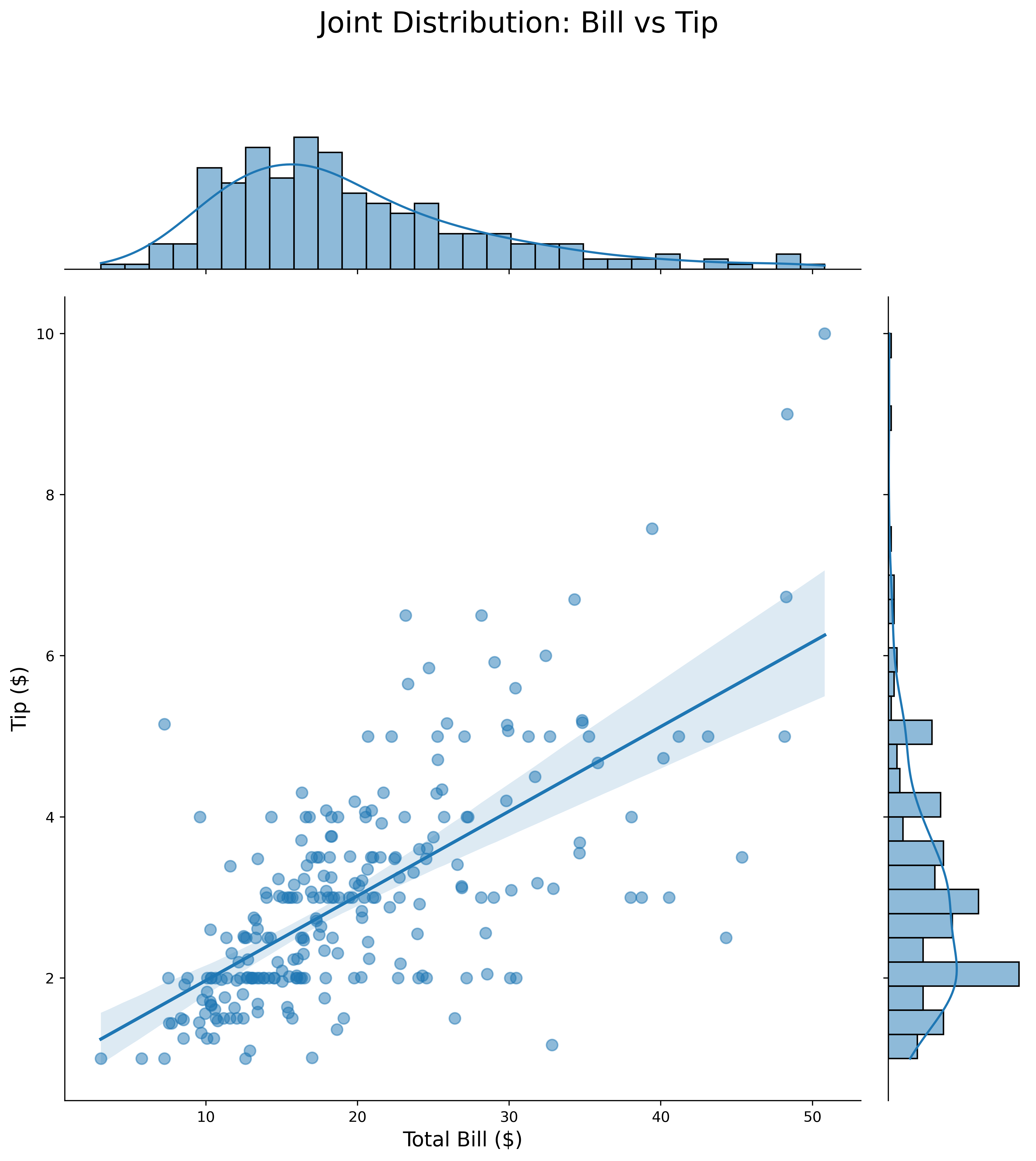
Combine scatter with marginal distributions:
tips = sns.load_dataset('tips')

g = sns.jointplot(data=tips,
                  x='total_bill',
                  y='tip',
                  kind='reg',
                  height=10,
                  ratio=5,
                  marginal_kws={'bins': 30, 'kde': True},
                  joint_kws={'scatter_kws': {'alpha': 0.5, 's': 60}})

g.fig.suptitle('Joint Distribution: Bill vs Tip', fontsize=20, y=1.1)
g.set_axis_labels('Total Bill ($)', 'Tip ($)', fontsize=14)
plt.show()
Joint plots show both the relationship and individual distributions simultaneously.
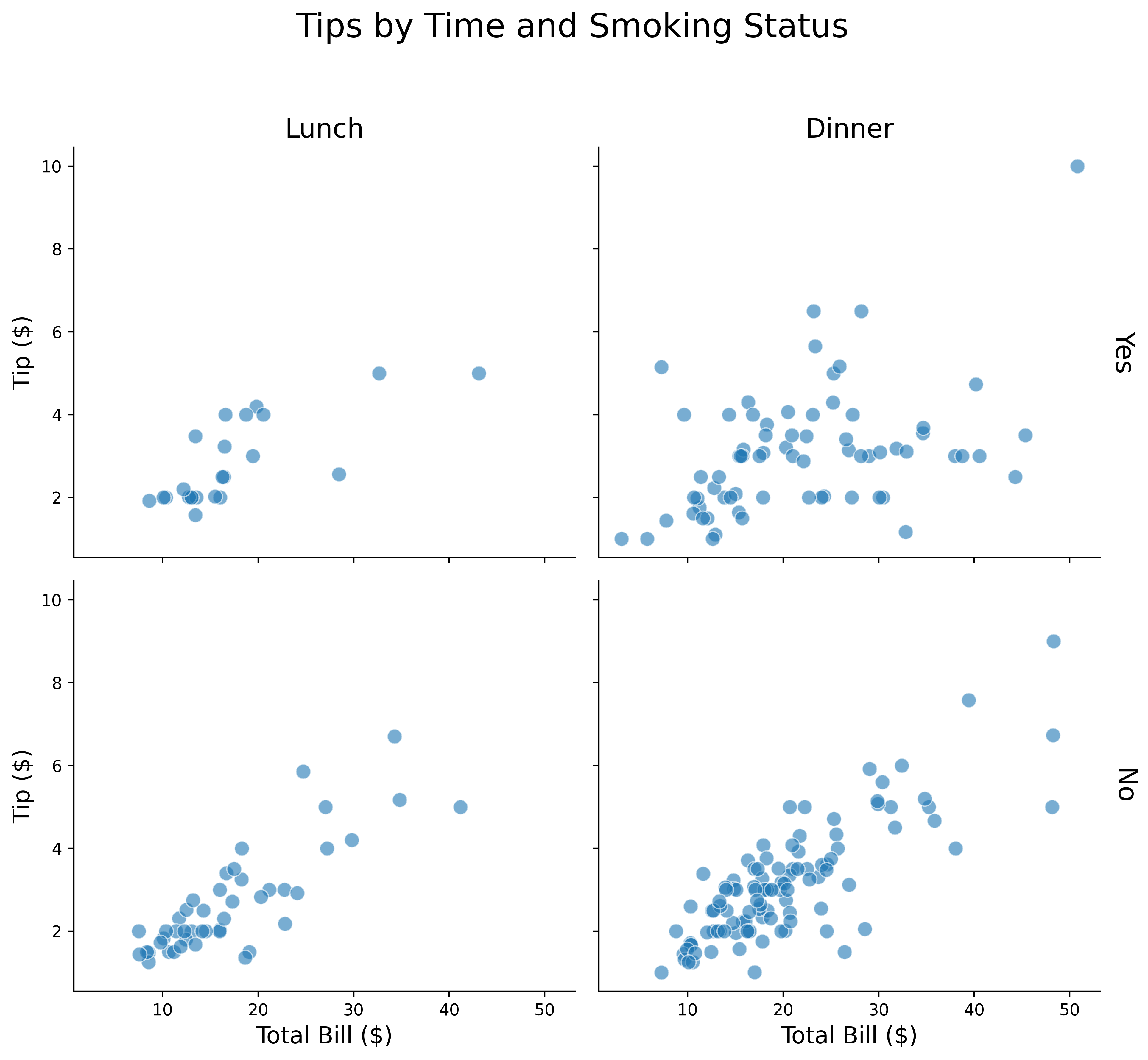
Create grids of plots by category:
tips = sns.load_dataset('tips')

g = sns.FacetGrid(tips,
                  col='time',
                  row='smoker',
                  height=4,
                  aspect=1.2,
                  margin_titles=True)

g.map_dataframe(sns.scatterplot,
                x='total_bill',
                y='tip',
                alpha=0.6,
                s=80)

g.set_axis_labels('Total Bill ($)', 'Tip ($)', fontsize=14)
g.set_titles(col_template='{col_name}', row_template='{row_name}', size=16)
g.fig.suptitle('Tips by Time and Smoking Status', fontsize=20, y=1.1)
plt.show()
FacetGrid is perfect for comparing subgroups side-by-side.
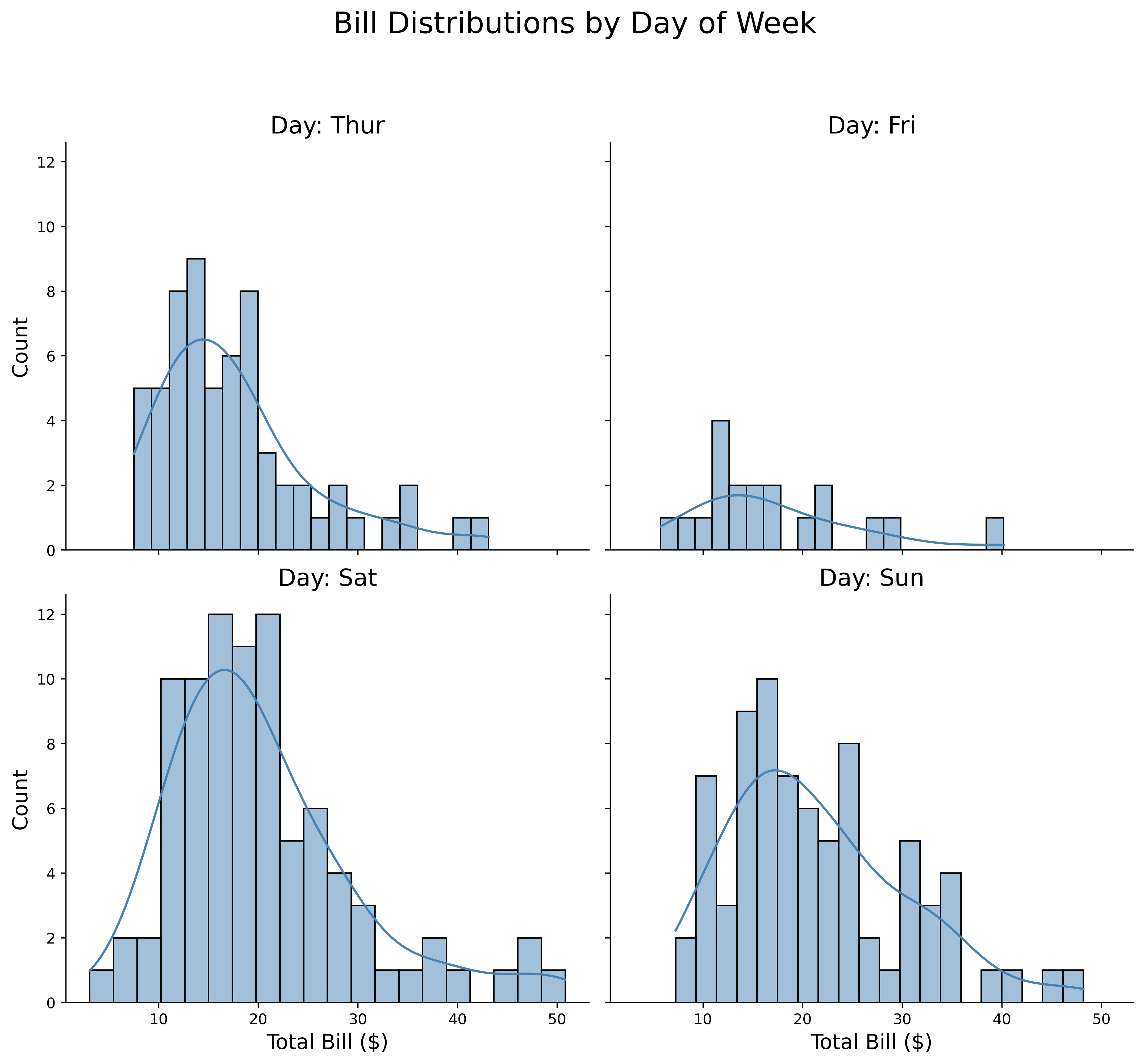
Apply any plot function to grid:
tips = sns.load_dataset('tips')

g = sns.FacetGrid(tips,
                  col='day',
                  col_wrap=2,
                  height=4.5,
                  aspect=1.2)

g.map_dataframe(sns.histplot,
                x='total_bill',
                kde=True,
                bins=20,
                color='steelblue')

g.set_axis_labels('Total Bill ($)', 'Count', fontsize=14)
g.set_titles(col_template='Day: {col_name}', size=16)
g.fig.suptitle('Bill Distributions by Day of Week', fontsize=20, y=1.1)
plt.show()
Use col_wrap to control the grid layout.
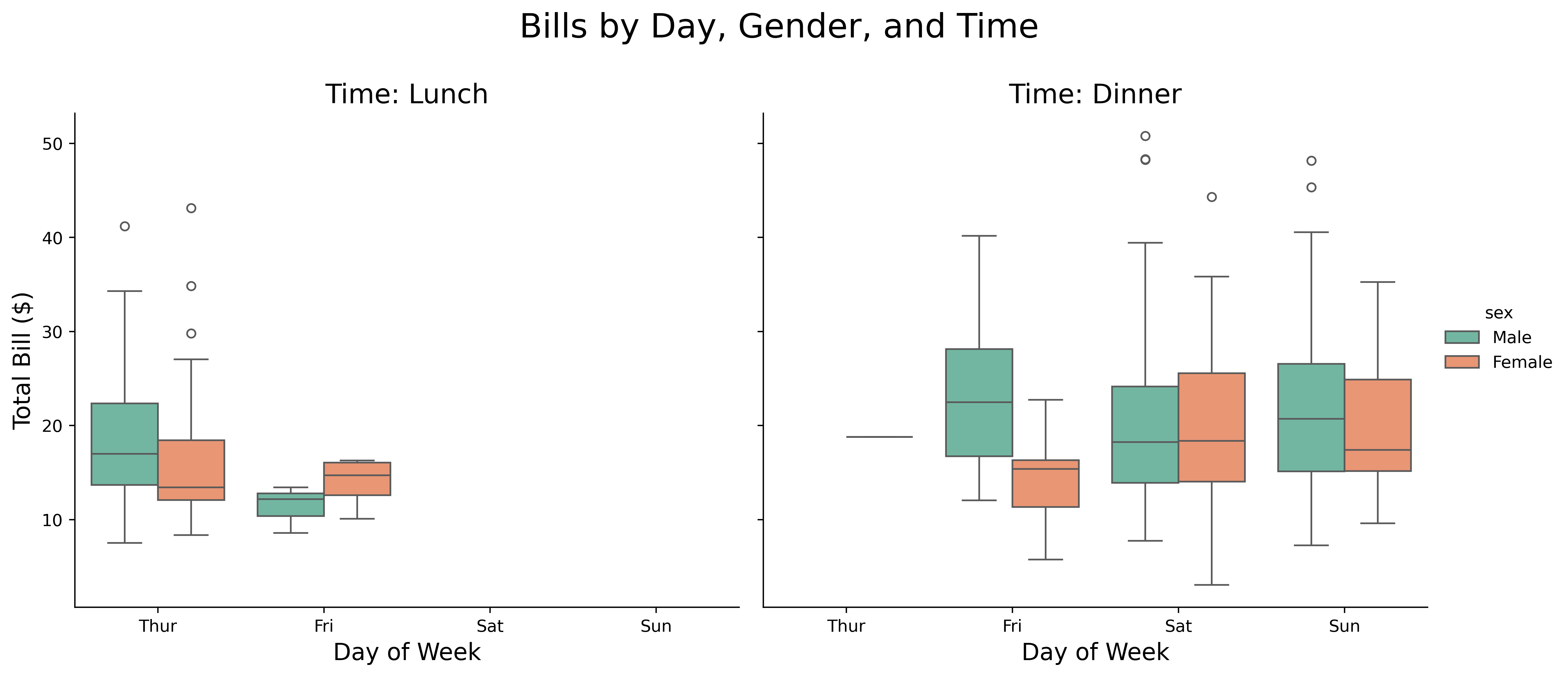
Unified interface for categorical data:
tips = sns.load_dataset('tips')

g = sns.catplot(data=tips,
                x='day',
                y='total_bill',
                hue='sex',
                col='time',
                kind='box',
                height=5,
                aspect=1.2,
                palette='Set2')

g.set_axis_labels('Day of Week', 'Total Bill ($)', fontsize=14)
g.set_titles(col_template='Time: {col_name}', size=16)
g.fig.suptitle('Bills by Day, Gender, and Time', fontsize=20, y=1.1)
plt.show()
catplot provides a consistent interface for all categorical plots.
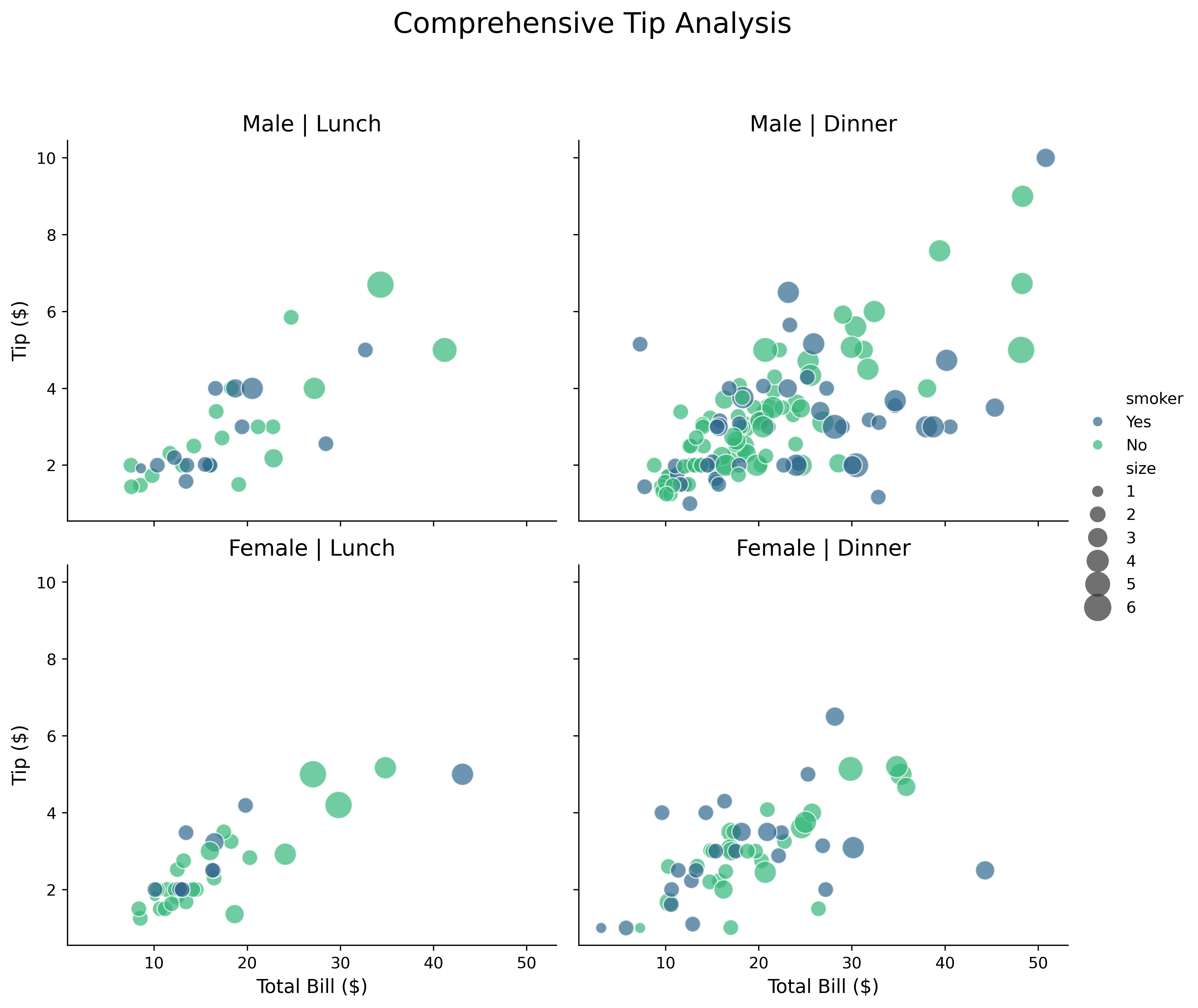
Unified interface for relational data:
tips = sns.load_dataset('tips')

g = sns.relplot(data=tips,
                x='total_bill',
                y='tip',
                hue='smoker',
                size='size',
                col='time',
                row='sex',
                kind='scatter',
                height=4,
                aspect=1.2,
                sizes=(50, 300),
                alpha=0.7,
                palette='viridis')

g.set_axis_labels('Total Bill ($)', 'Tip ($)', fontsize=12)
g.set_titles(col_template='{col_name}', row_template='{row_name}', size=14)
g.fig.suptitle('Comprehensive Tip Analysis', fontsize=18, y=1.1)
plt.show()
relplot handles scatter and line plots with faceting.
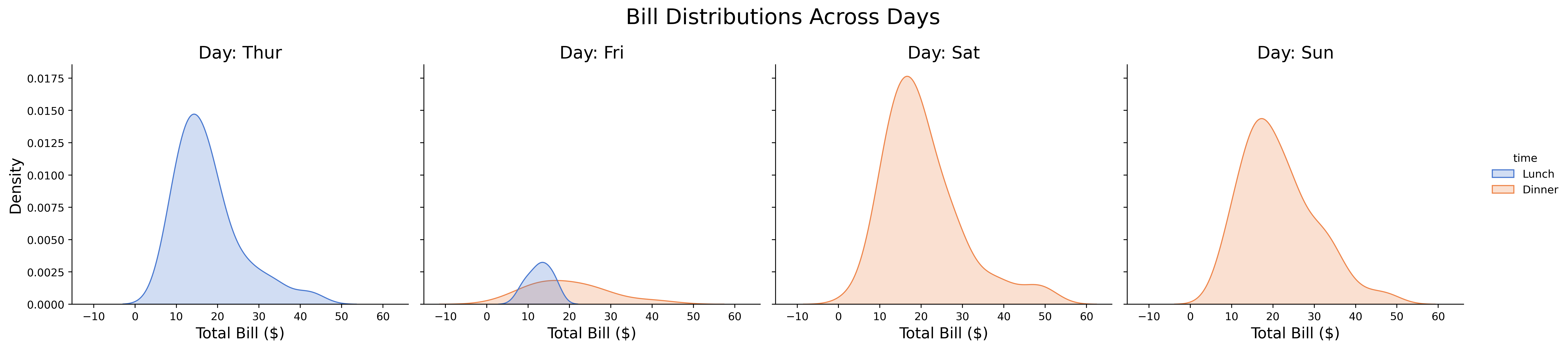
Comprehensive distribution visualization:
tips = sns.load_dataset('tips')

g = sns.displot(data=tips,
                x='total_bill',
                hue='time',
                col='day',
                kind='kde',
                fill=True,
                height=4,
                aspect=1.2,
                palette='muted')

g.set_axis_labels('Total Bill ($)', 'Density', fontsize=14)
g.set_titles(col_template='Day: {col_name}', size=16)
g.fig.suptitle('Bill Distributions Across Days', fontsize=20, y=1.1)
plt.show()
displot combines histograms, KDE, and ECDF with faceting.
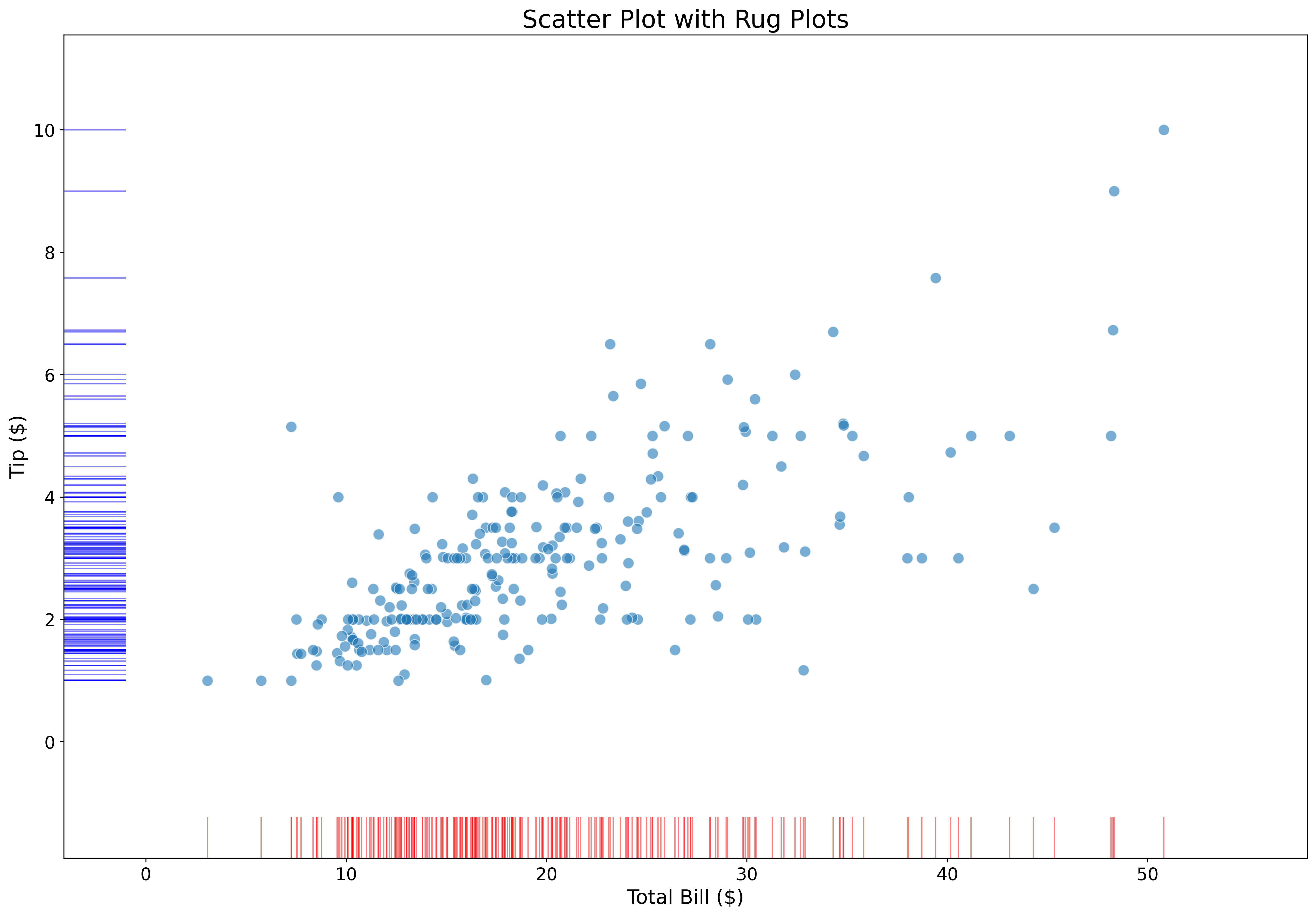
Add marginal tick marks:
fig, ax = plt.subplots(figsize=(18, 12))

tips = sns.load_dataset('tips')

sns.scatterplot(data=tips,
                x='total_bill',
                y='tip',
                alpha=0.6,
                s=80,
                ax=ax)

sns.rugplot(data=tips,
            x='total_bill',
            height=0.05,
            color='red',
            alpha=0.5,
            ax=ax)

sns.rugplot(data=tips,
            y='tip',
            height=0.05,
            color='blue',
            alpha=0.5,
            ax=ax)

ax.set_xlabel('Total Bill ($)', fontsize=16)
ax.set_ylabel('Tip ($)', fontsize=16)
ax.set_title('Scatter Plot with Rug Plots', fontsize=20)
ax.tick_params(labelsize=14)
plt.show()
Rug plots show exact data point locations along axes.
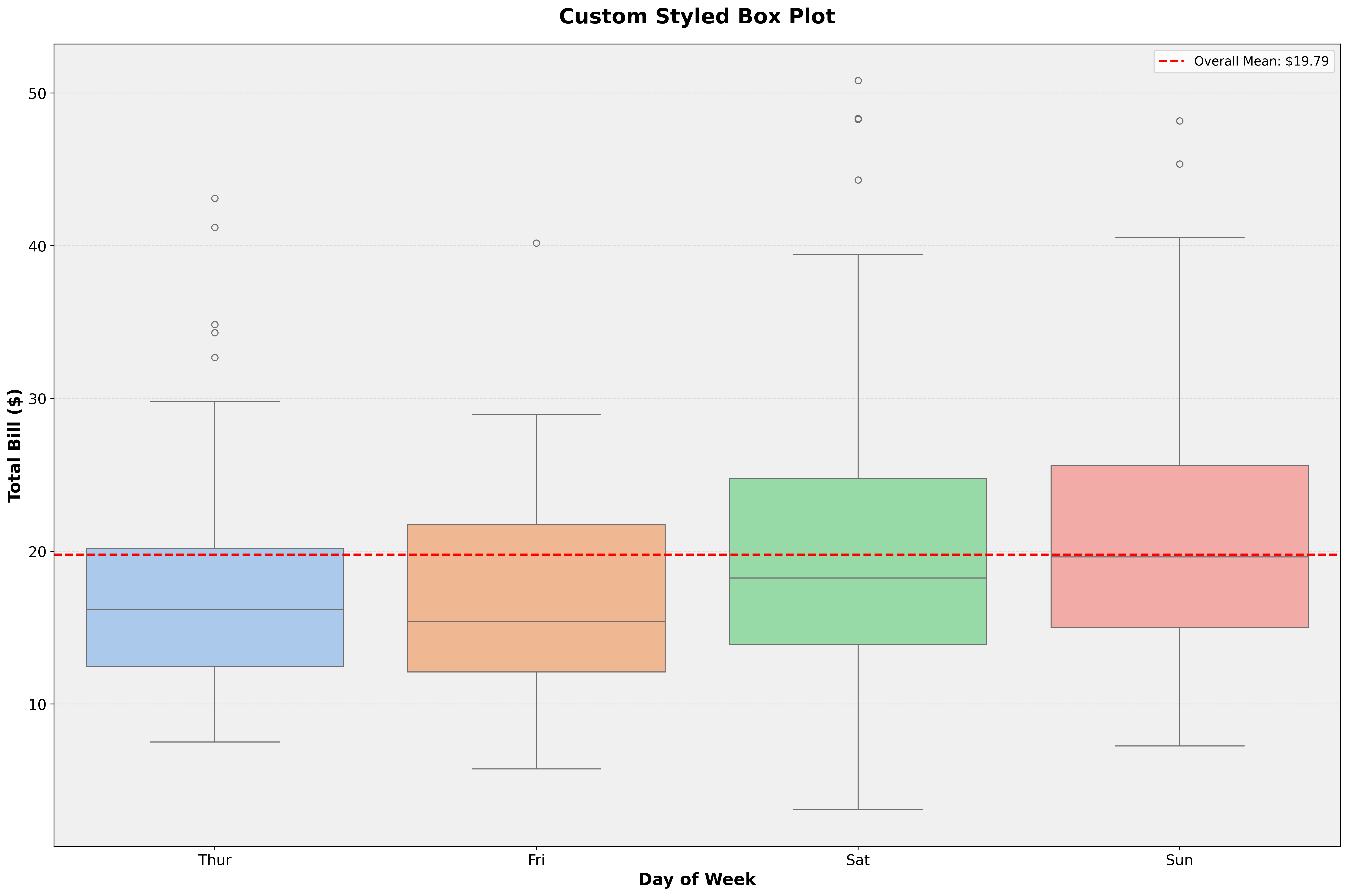
Combine Seaborn with Matplotlib:
fig, ax = plt.subplots(figsize=(18, 12))

tips = sns.load_dataset('tips')

# Create Seaborn plot
sns.boxplot(data=tips,
            x='day',
            y='total_bill',
            palette='pastel',
            ax=ax)

# Customize with Matplotlib
ax.set_xlabel('Day of Week', fontsize=16, fontweight='bold')
ax.set_ylabel('Total Bill ($)', fontsize=16, fontweight='bold')
ax.set_title('Custom Styled Box Plot', fontsize=20, fontweight='bold', pad=20)
ax.tick_params(labelsize=14)
ax.grid(axis='y', alpha=0.3, linestyle='--')
ax.set_facecolor('#f0f0f0')

# Add reference line
mean_bill = tips['total_bill'].mean()
ax.axhline(mean_bill, color='red', linestyle='--', linewidth=2,
           label=f'Overall Mean: ${mean_bill:.2f}')
ax.legend(fontsize=12)

plt.tight_layout()
plt.show()
Seaborn handles the plot, Matplotlib handles the polish.
Adjust plots for different media:
import matplotlib.pyplot as plt
import seaborn as sns

tips = sns.load_dataset('tips')
contexts = ['paper', 'notebook', 'talk', 'poster']

for context in contexts:
    sns.set_context(context)

    fig, ax = plt.subplots(figsize=(8, 6))

    sns.scatterplot(
        data=tips,
        x='total_bill',
        y='tip',
        alpha=0.6,
        ax=ax
    )

    ax.set_title(f'Context: {context}', fontsize=18)
    ax.set_xlabel('Total Bill ($)')
    ax.set_ylabel('Tip ($)')

    plt.tight_layout()
    plt.show()

# Reset to default
sns.set_context('notebook')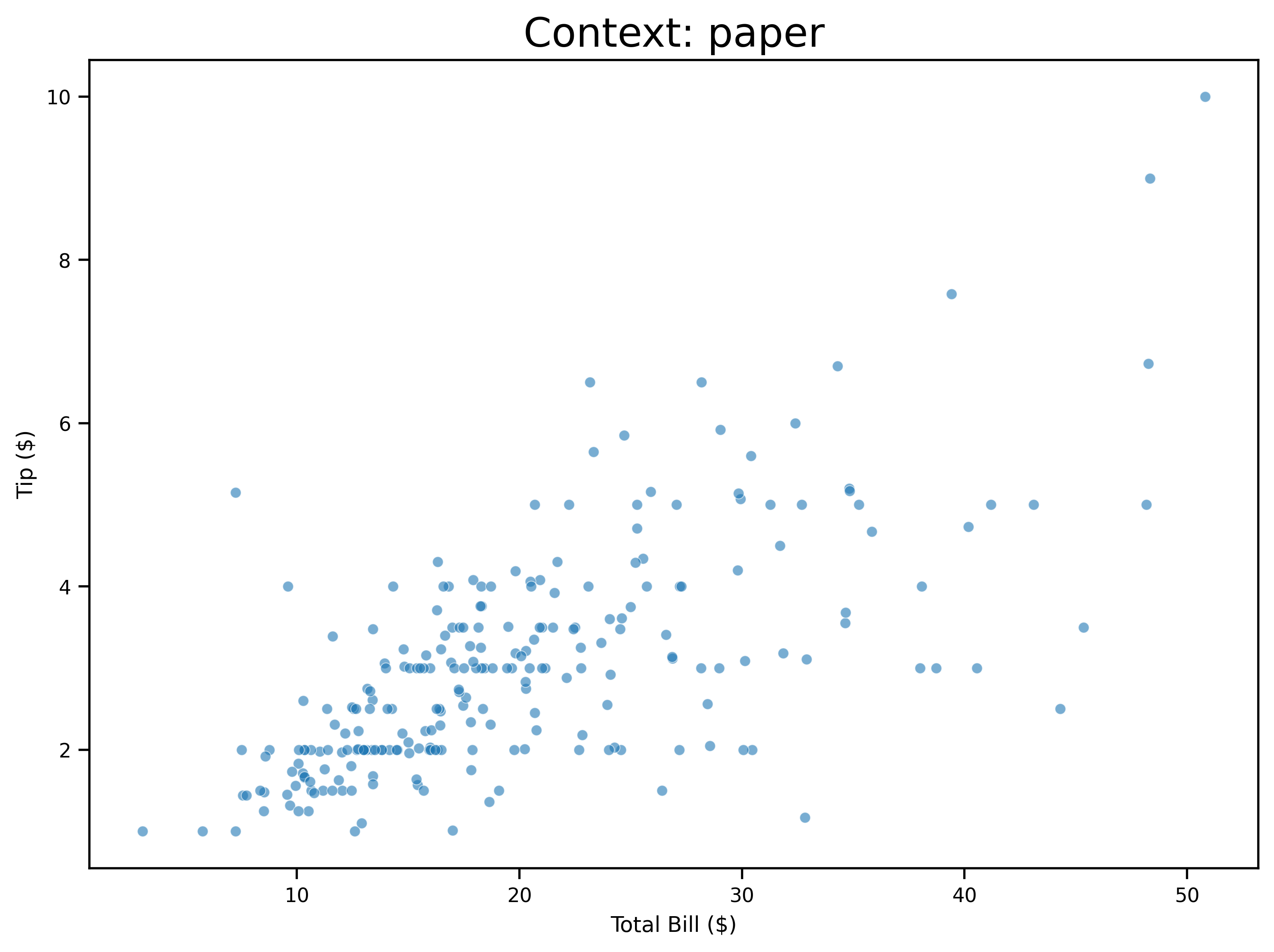
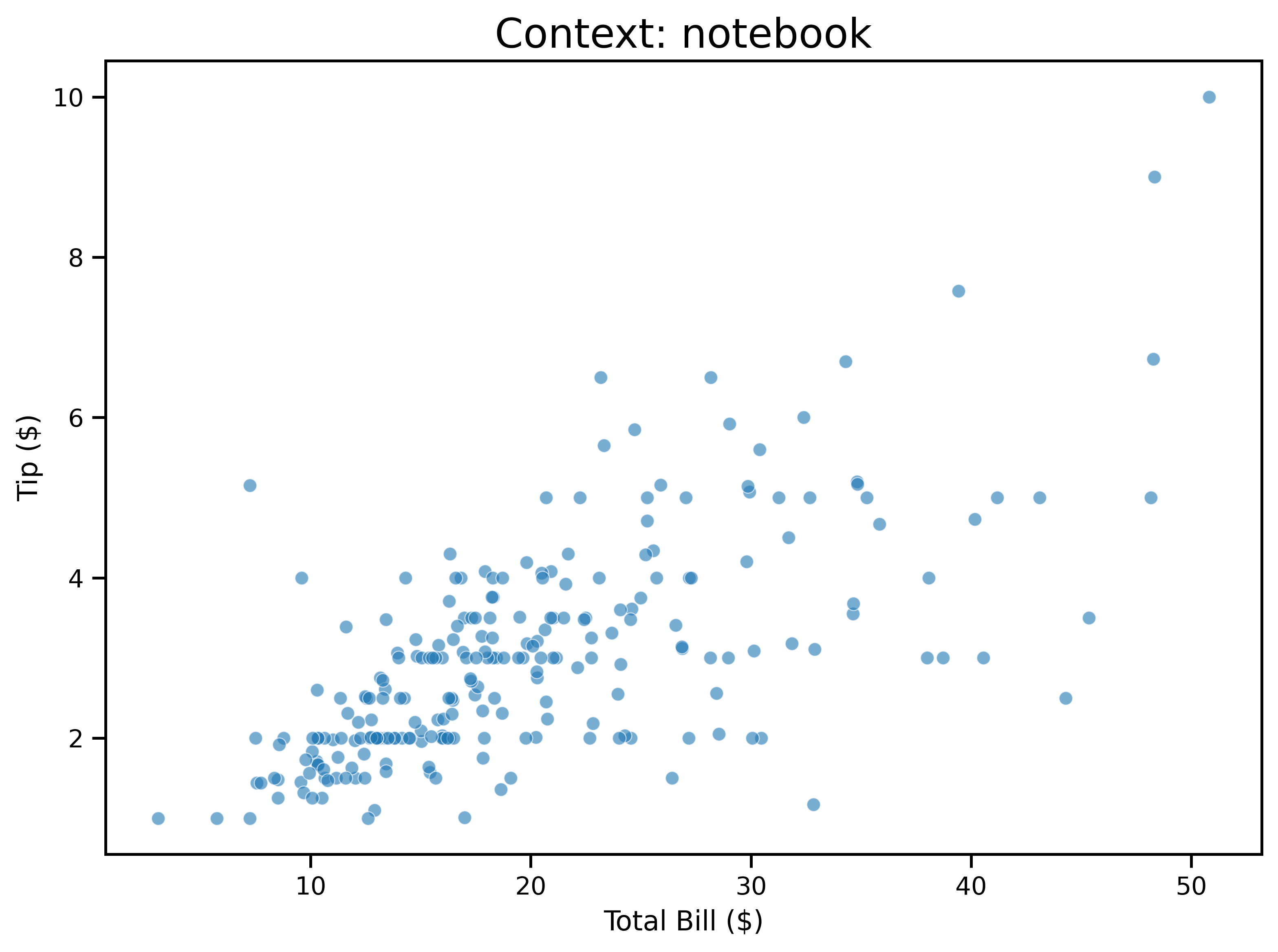
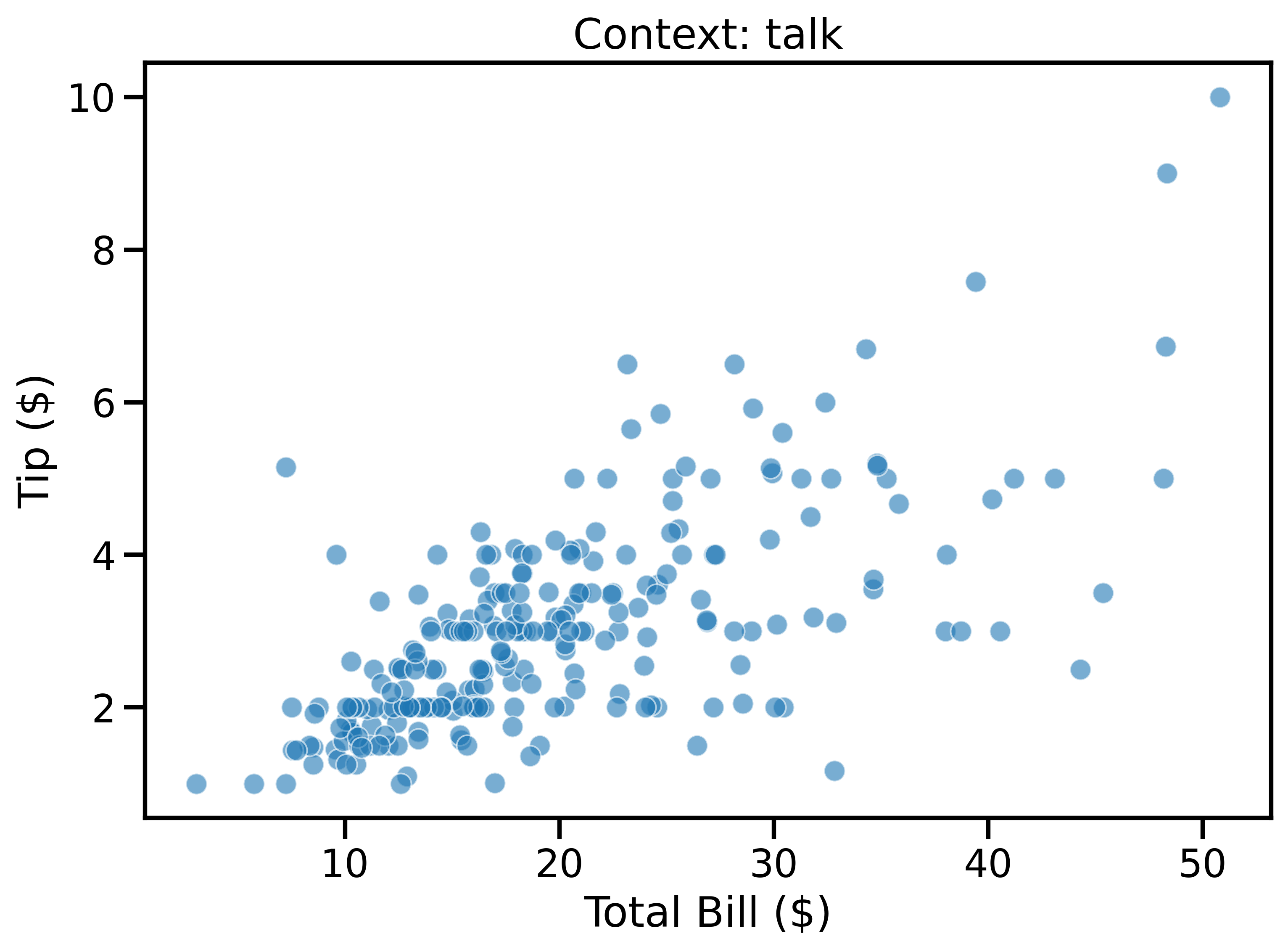
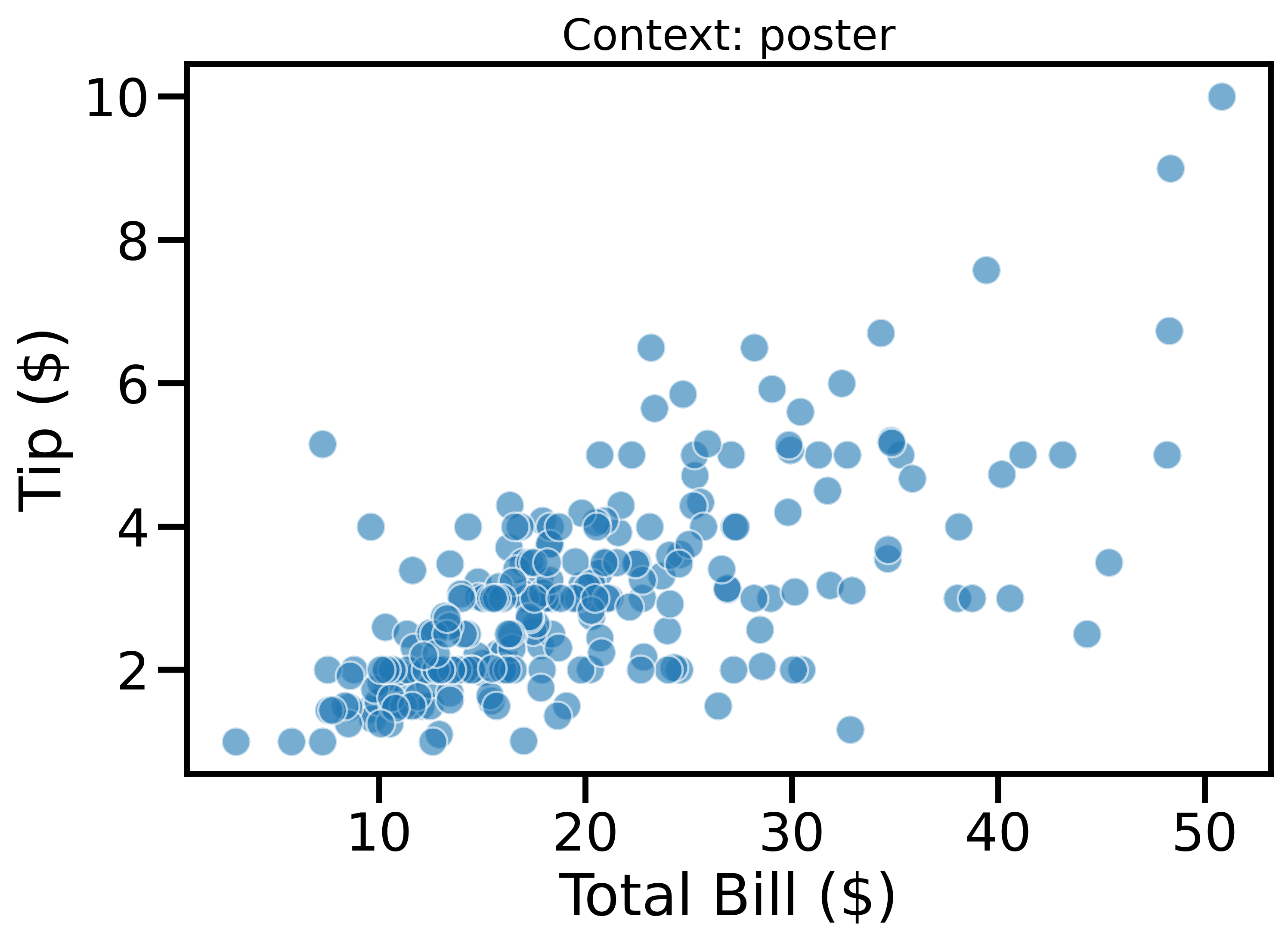
Contexts automatically scale plot elements for different presentation settings.
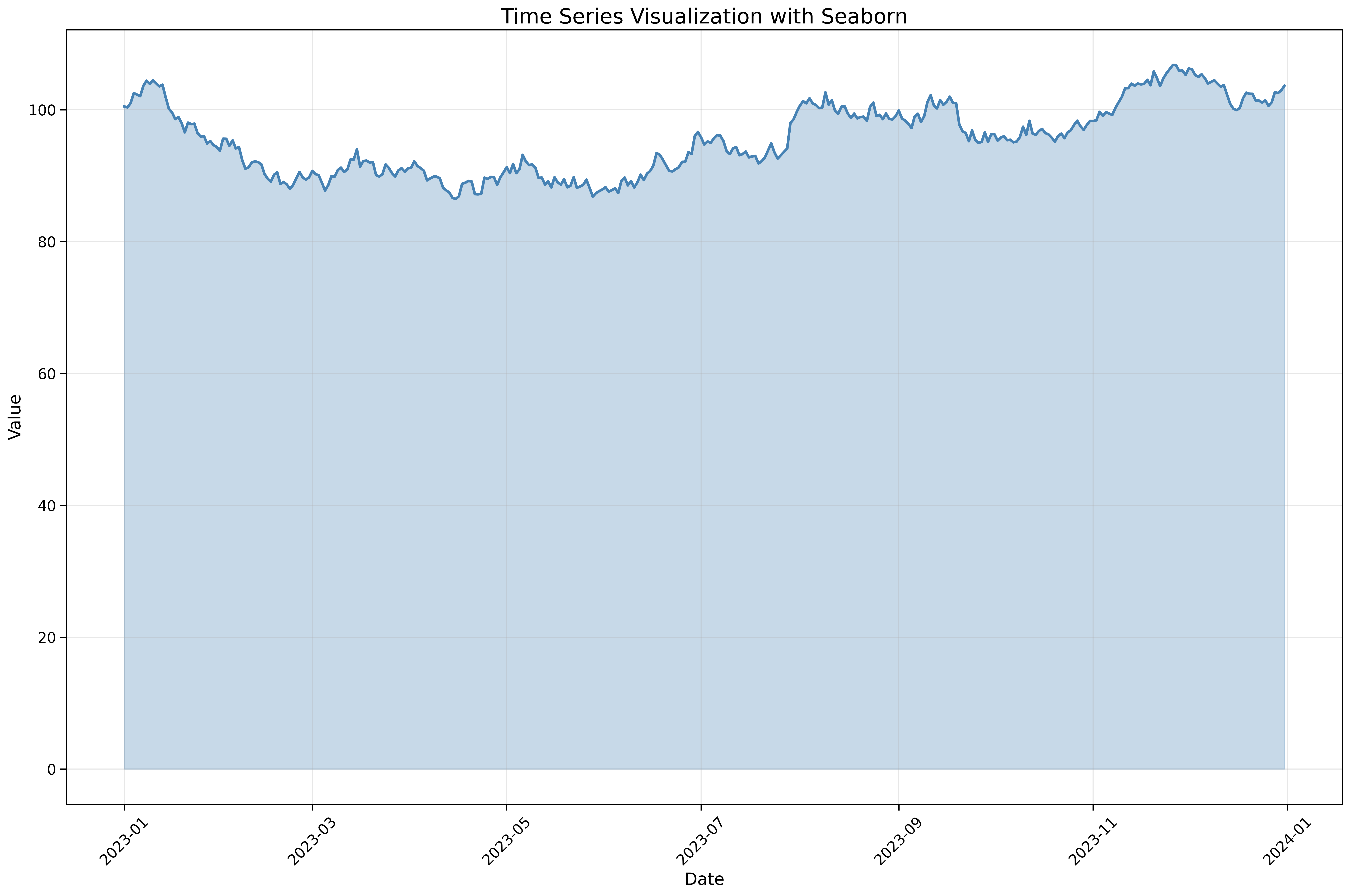
Visualize temporal patterns:
fig, ax = plt.subplots(figsize=(18, 12))

# Create sample time series data
dates = pd.date_range('2023-01-01', periods=365, freq='D')
np.random.seed(42)
values = np.cumsum(np.random.randn(365)) + 100

df = pd.DataFrame({'date': dates, 'value': values})

sns.lineplot(data=df,
             x='date',
             y='value',
             linewidth=2.5,
             color='steelblue',
             ax=ax)

ax.fill_between(df['date'], df['value'], alpha=0.3, color='steelblue')

ax.set_xlabel('Date', fontsize=16)
ax.set_ylabel('Value', fontsize=16)
ax.set_title('Time Series Visualization with Seaborn', fontsize=20)
ax.tick_params(labelsize=14)
ax.grid(True, alpha=0.3)
plt.xticks(rotation=45)
plt.tight_layout()
plt.show()
Seaborn works seamlessly with pandas datetime indices.
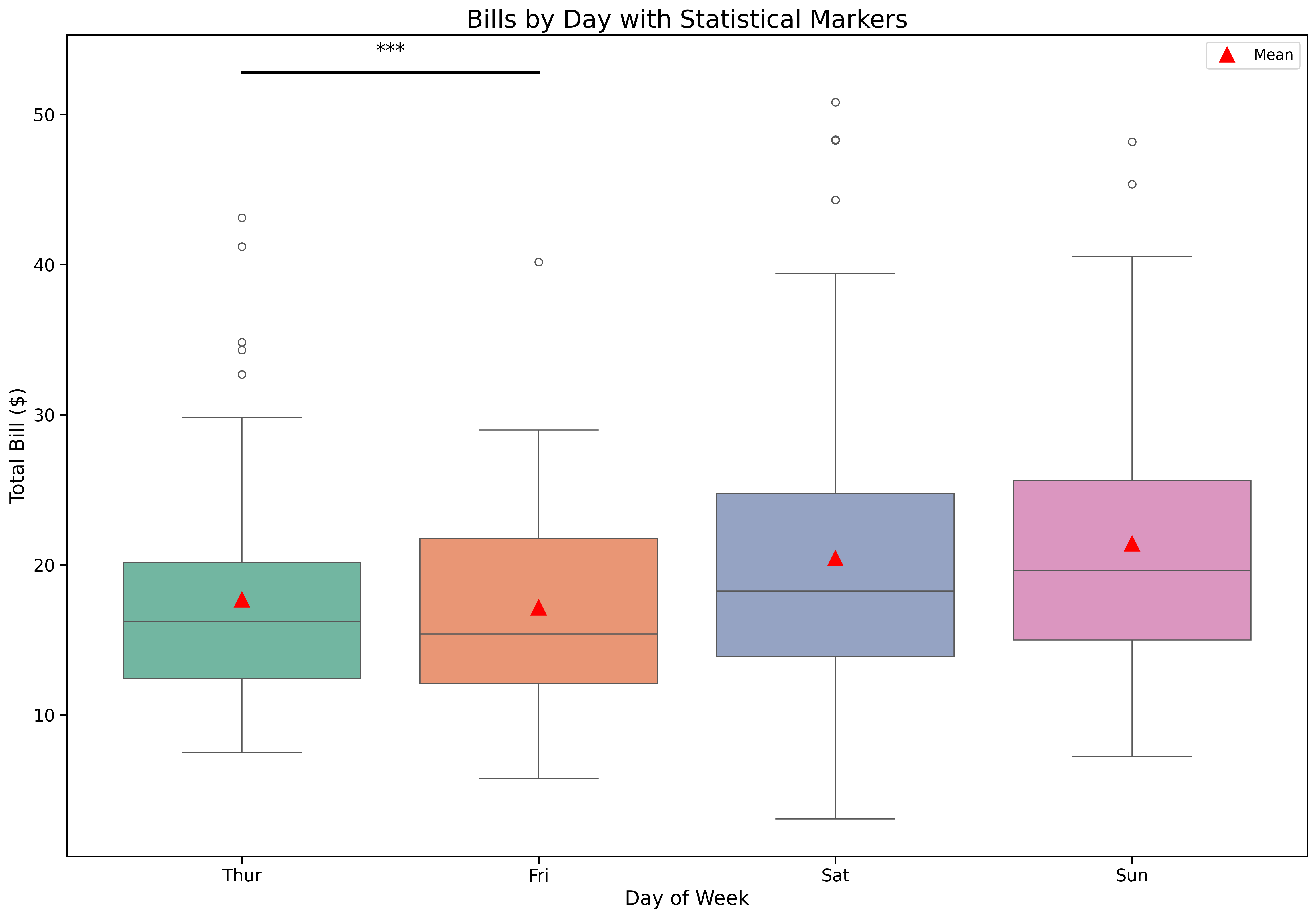
Add statistical test results:
from scipy import stats

fig, ax = plt.subplots(figsize=(18, 12))

tips = sns.load_dataset('tips')

sns.boxplot(data=tips,
            x='day',
            y='total_bill',
            palette='Set2',
            ax=ax)

# Add mean markers
means = tips.groupby('day')['total_bill'].mean()
positions = range(len(means))
ax.plot(positions, means, 'r^', markersize=12, label='Mean', zorder=3)

ax.set_xlabel('Day of Week', fontsize=16)
ax.set_ylabel('Total Bill ($)', fontsize=16)
ax.set_title('Bills by Day with Statistical Markers', fontsize=20)
ax.tick_params(labelsize=14)
ax.legend(fontsize=12)

# Add significance brackets (example)
y_max = tips['total_bill'].max()
ax.plot([0, 1], [y_max + 2, y_max + 2], 'k-', linewidth=2)
ax.text(0.5, y_max + 3, '***', ha='center', fontsize=16)

plt.show()
Combine statistical tests with beautiful visualizations.